


Connect OpenClaw to Polymarket
Connect OpenClaw to Polymarket: 1. Sign in to ApexGenius and connect Polymarket. 2. Add the ApexGenius MCP server. 3. Start using Polymarket in OpenClaw.
1,000 free credits · No card required
How to connect Polymarket to OpenClaw
- 1Sign in to ApexGenius and connect Polymarket
- 2Add the ApexGenius MCP server to OpenClaw
- 3Start using Polymarket in OpenClaw
- 1
Connect Polymarket to ApexGenius
Open Polymarket in ApexGenius
Open Polymarket in Connections and choose Connect.
- 2
Connect ApexGenius to OpenClaw
Copy the MCP address
On Start, pick API key, open Manual setup, and copy the MCP address.
- 3
Approve access
ApexGenius opens its approval page. Review the access, then approve.
Add the ApexGenius MCP server to OpenClaw
OpenClaw saves outbound MCP servers under mcp.servers in its config. Add one from the terminal, or in the Control UI under Settings, then MCP.
- Run the command. To use the Control UI instead, open Settings, then MCP, then Add server, choose Streamable HTTP, enter the address, and set
authtooauthin the config editor on that page. - Sign in. In Settings, then MCP, choose Sign in for apexgenius and approve ApexGenius in your browser.
- From a terminal instead, stop the Gateway, run
openclaw mcp login apexgenius, follow the printed authorization URL, then start the Gateway again.
openclaw mcp add apexgenius \
  --url https://server.autom8.pro/mcp \
  --transport streamable-http \
  --auth oauth
Check it. Run openclaw mcp doctor apexgenius --probe. It opens a live connection and lists what the server offers. Saving a server does not prove it answers.
Steps follow OpenClaw documentation, Connect MCP servers (opens in a new tab), read November 12, 2026.
Then ask OpenClaw
Read one public topic tag from Polymarket. Show its ID, label, source and the time checked.
Written setup, step by stepShow
Before you start
- An ApexGenius account.
- No wallet, private key or Polymarket sign-in is needed for these public reads.
1. Connect Polymarket to ApexGenius
- Open Polymarket in Connections. Sign in to ApexGenius, open Connections and choose Polymarket.
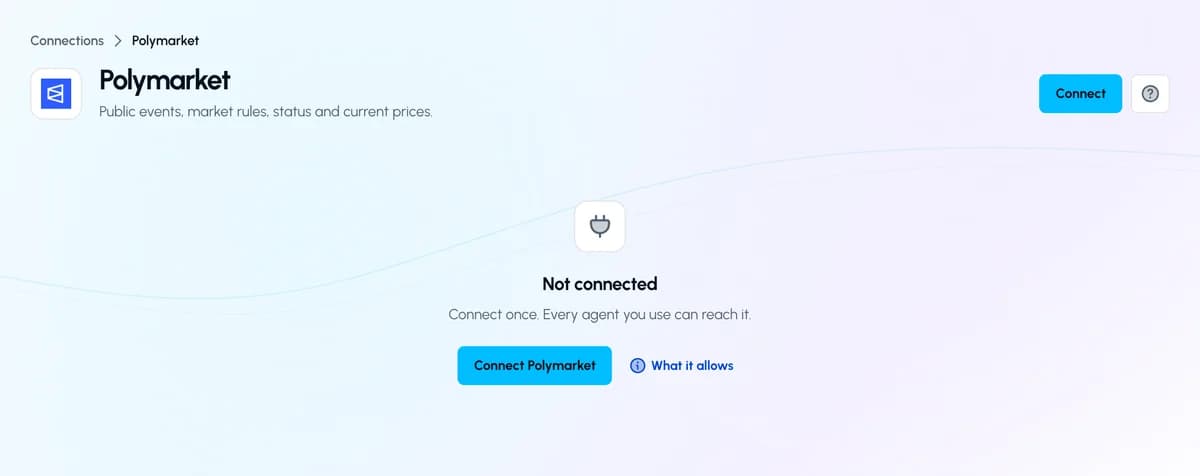
The Polymarket page before you connect. Choose Connect; there is no wallet, sign-in or key to enter.Open full-size image (opens in a new tab) - Check the public data service. Choose Connect. ApexGenius must complete a public data read before it saves a healthy connection. If the service denies access, setup stops.
- Review the read tools. Keep the public data service and the reads you need on. Set up a compatible AI agent with ApexGenius.
- Read one category. Load the PolymarketPublic skill and try the question below. Check the returned source and Tool Activity.
2. Connect ApexGenius to OpenClaw
Use this server address when adding the connection:
https://server.autom8.pro/mcpThe steps are above, under Add the ApexGenius MCP server to OpenClaw. These notes apply to OpenClaw only.
- Set the transport. When transport is left out, OpenClaw uses SSE. ApexGenius serves Streamable HTTP, so keep
--transport streamable-http. - Browser on another machine. If the browser cannot reach the callback, copy the code it returns and run
openclaw mcp login apexgenius --codewith that code. - If sign-in is needed again.
openclaw mcp status --verboseshows whether a server needs authorization. Until it is signed in, OpenClaw leaves that one server out of the agent’s tools instead of failing the turn. - Reloading.
openclaw mcp reloadrefreshes only the current CLI process. A Gateway running elsewhere needs its own reload or restart. - Access. When ApexGenius asks what OpenClaw may use, choose Read only for the first test, or Custom to limit it to the tools you need.
3. Verify one safe read
Read one public topic tag from Polymarket. Show its ID, label, source and the time checked.
Read one public topic tag from Polymarket. Show its ID, label, source and the time checked.A returned tag verifies this public read only. A saved setting or a denied request is not proof the connector works. Prices are public market data, not advice; there are no wallet, order or trading tools.
Full guide: the Polymarket setup guide.
What it looks like in OpenClaw
Illustration of a task, not a recorded customer result. Your answers come from the account and dates you choose.

apex_call_read_toolsalesforce_read · Find matching recordsCompleteapex_call_read_toolsalesforce_read · Read related activityComplete
apex_call_read_tooln8n_get_workflow · Check workflow statusCompleteThree safe example reads returned results. Nothing was changed.
Read-only routeTry asking
Read one public topic tag from Polymarket. Show its ID, label, source and the time checked.
Find the Polymarket market for the event I name. Show each outcome's current price and the time checked, and say prices are market data, not a prediction.
Read the rules and published status for the market ID I provide. Do not infer a final outcome from the closed flag.
List Polymarket sports categories and their IDs. Do not infer which events have markets.
What OpenClaw can do in Polymarket
7 operations: 7 read. Every operation looks things up and changes nothing, so OpenClaw cannot change Polymarket through ApexGenius.
Public market data
7 readpolymarket_search_publicreadSearch public events and tags by text.
polymarket_list_eventsreadRead a bounded page of events with their markets and current prices.
polymarket_get_eventreadRead an event, its markets and their current prices by ID.
polymarket_list_marketsreadRead a bounded page of market questions, status and current prices.
polymarket_get_marketreadRead a market's question, rules, status and current prices by ID.
polymarket_list_tagsreadRead topic IDs and labels.
polymarket_list_sportsreadRead the sports category catalog.
You choose the access. When you approve OpenClaw, pick Full access, Read only, or Custom.
ApexGenius exposes the official Gamma API through its MCP gateway. This is not a vendor-hosted Polymarket MCP.
Only bounded public reads are offered. Prices are public market data, not advice. No wallets, funding or order operations are exposed.
Match the exact event and market question. A closed flag alone does not establish final resolution.
Provider access rules and rate limits still apply. An access denial must not be bypassed or reported as healthy.
Disconnecting stops future gateway calls. It does not change public source data.
Questions about connecting OpenClaw to Polymarket
Updated November 12, 2026.
How do I connect OpenClaw to Polymarket?
Sign in to ApexGenius and connect Polymarket. In OpenClaw, run openclaw mcp add apexgenius --url https://server.autom8.pro/mcp --transport streamable-http --auth oauth, then sign in from Settings, then MCP. Then ask OpenClaw: “Read one public topic tag from Polymarket. Show its ID, label, source and the time checked.” Start with a read, so nothing changes.
How do I check that OpenClaw can use Polymarket?
Run openclaw mcp doctor apexgenius --probe. It opens a live connection and lists what the server offers. If openclaw mcp status --verbose reports that authorization is required, sign in again from Settings, then MCP, or with openclaw mcp login apexgenius. Then ask: “Read one public topic tag from Polymarket. Show its ID, label, source and the time checked.”
Is Polymarket available in ApexGenius?
Yes. Choose Connect in Connections. No wallet, key or sign-in is needed, and ApexGenius saves the connection only after a successful public read.
Is this Polymarket’s official hosted MCP?
No. ApexGenius exposes a small set of reads from Polymarket’s official Gamma API through its own MCP gateway. It is not a Polymarket-hosted MCP service or a partnership claim.
Do I need a wallet or API key?
No. These public reads need no wallet, private key, password or API key.
Can it read current prices?
Yes. Market reads include each outcome's current price from 0 to 1, the best bid and ask, the last trade, volume and liquidity, as Polymarket publishes them. Prices are market data, not advice.
Can the connector place bets?
No. It has no wallet, order, funding or trading operations, and it asks for no keys. It cannot sign transactions or move money.
Does it prove a Worlds market exists?
No. A sports category or game schedule does not prove market availability. Match the exact event and market question in a verified source result.
More connections like this one
OpenClaw with other apps
 Mobbin
 Slack
 Discord
 Context.dev
 Notion
 Google Meet
 Gmail
 Google Chat
All 48 apps OpenClaw can use
 Google Docs
 Google Drive
 Google Slides
 Atlassian Rovo
 OP.GG
 Confluence
 Supabase
 Cal.com
 ChatGPT Ads
 GitHub
 Stripe
 Attio
 Semrush
 Apify
 Linear
 Jira
 HQ Rental
 Google Ads
 Google Analytics
 Google Forms
 Google Tasks
 Google Calendar
 Google Sheets
 Apollo
 Blotato
 Bing Webmaster
 Calendly
 ClickUp
 monday.com
 YouTube
- YouTube Analytics
- Salesforce
- n8n
 Google Search Console
 ElevenLabs
 FreshBooks
 Trello
 GitLab
 TypeSafe
 HubSpot
Other agents with Polymarket
 Claude
 Grok Bot
 Muse
Connect Polymarket to OpenClaw today
Start free1,000 free credits. No card required. Disconnect any time.