Connect Salesforce to Claude

Ask Claude a question about your org and get the answer from the live records, then move into schema, Apex, and deployment work when the task needs it.

7 days free · No card required

How to connect Salesforce to Claude

Watch the connection

12-second loop · Silent, with captions

Read the steps Follow along at your own pace

1. Create your account

ApexGenius signup page with Continue with Google and the email form.
Create your account. Open apexgenius.ai/signup and continue with Google or your email.

2. Choose Salesforce

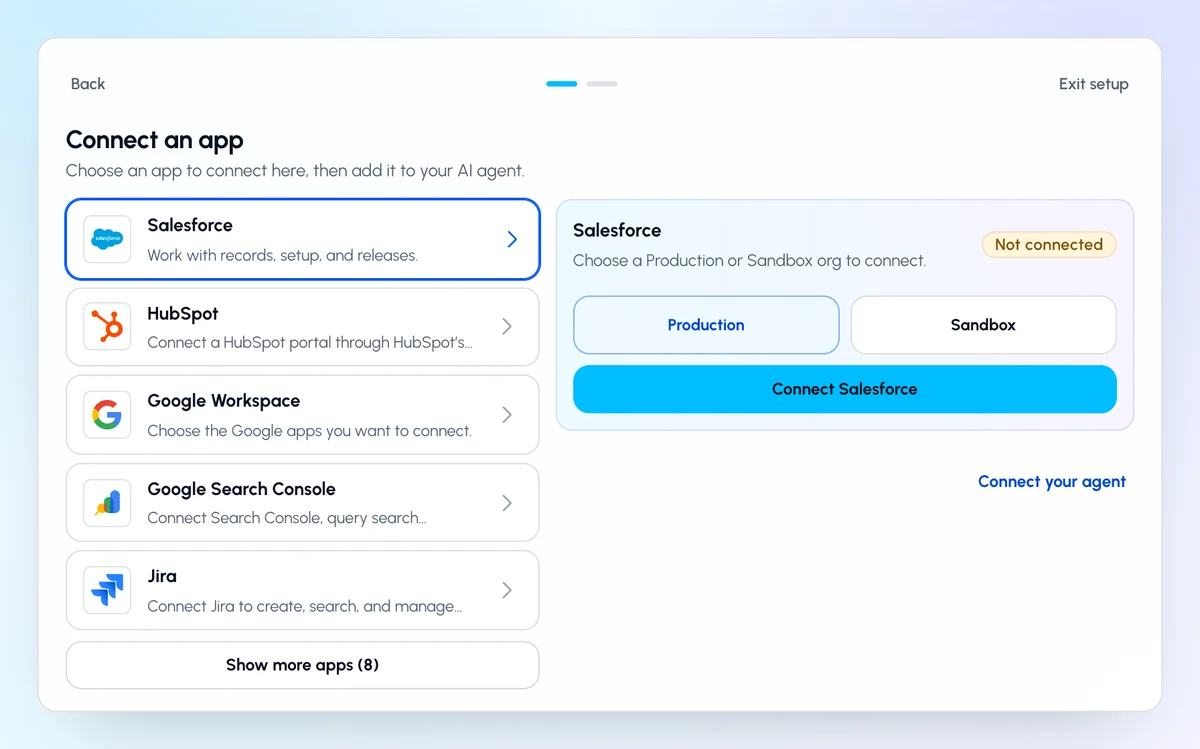
ApexGenius Start with Salesforce selected, the Production and Sandbox choice, and the Connect Salesforce button.
Choose Salesforce. On Start, pick Salesforce, choose Production or Sandbox, then click Connect Salesforce.

3. Allow access

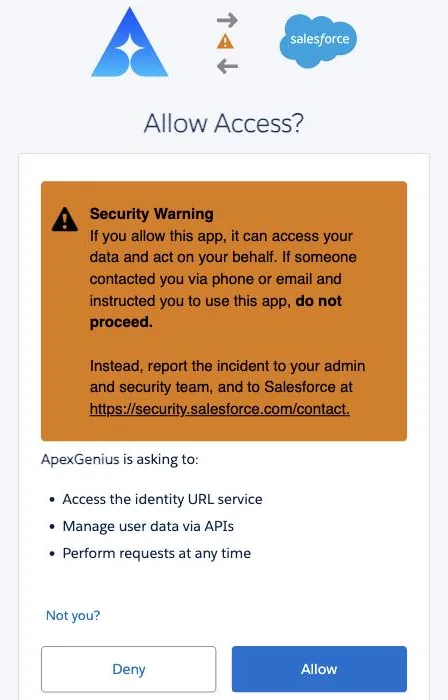
The Salesforce Allow Access screen listing what ApexGenius is asking for, with Deny and Allow buttons.
Allow access. Salesforce opens its sign in page. Sign in there and click Allow.

4. Choose Claude

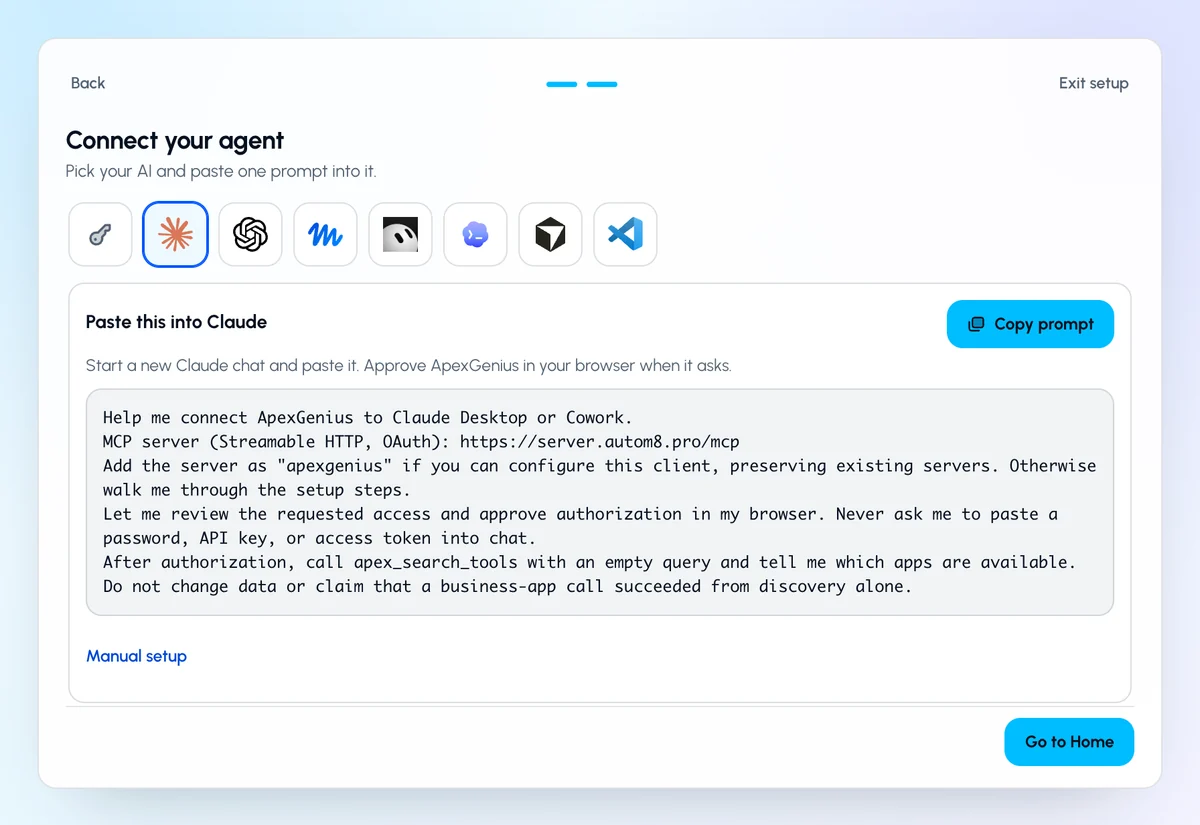
ApexGenius Start with Claude Desktop and Cowork selected, the MCP address to copy, and the short setup steps.
Choose Claude. Back on Start, pick Claude and copy the MCP address.

5. Add it in Claude

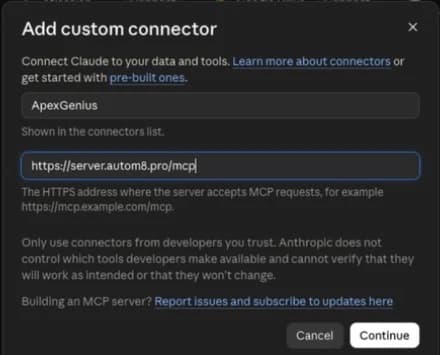
Claude Desktop Add custom connector form filled with the ApexGenius name and remote MCP server URL.
Add it in Claude. In Claude, open Settings, then Connectors, then Add custom connector. Paste the address.

6. Approve access

ApexGeniusapexgenius.ai/authorizeFull size (opens in a new tab)
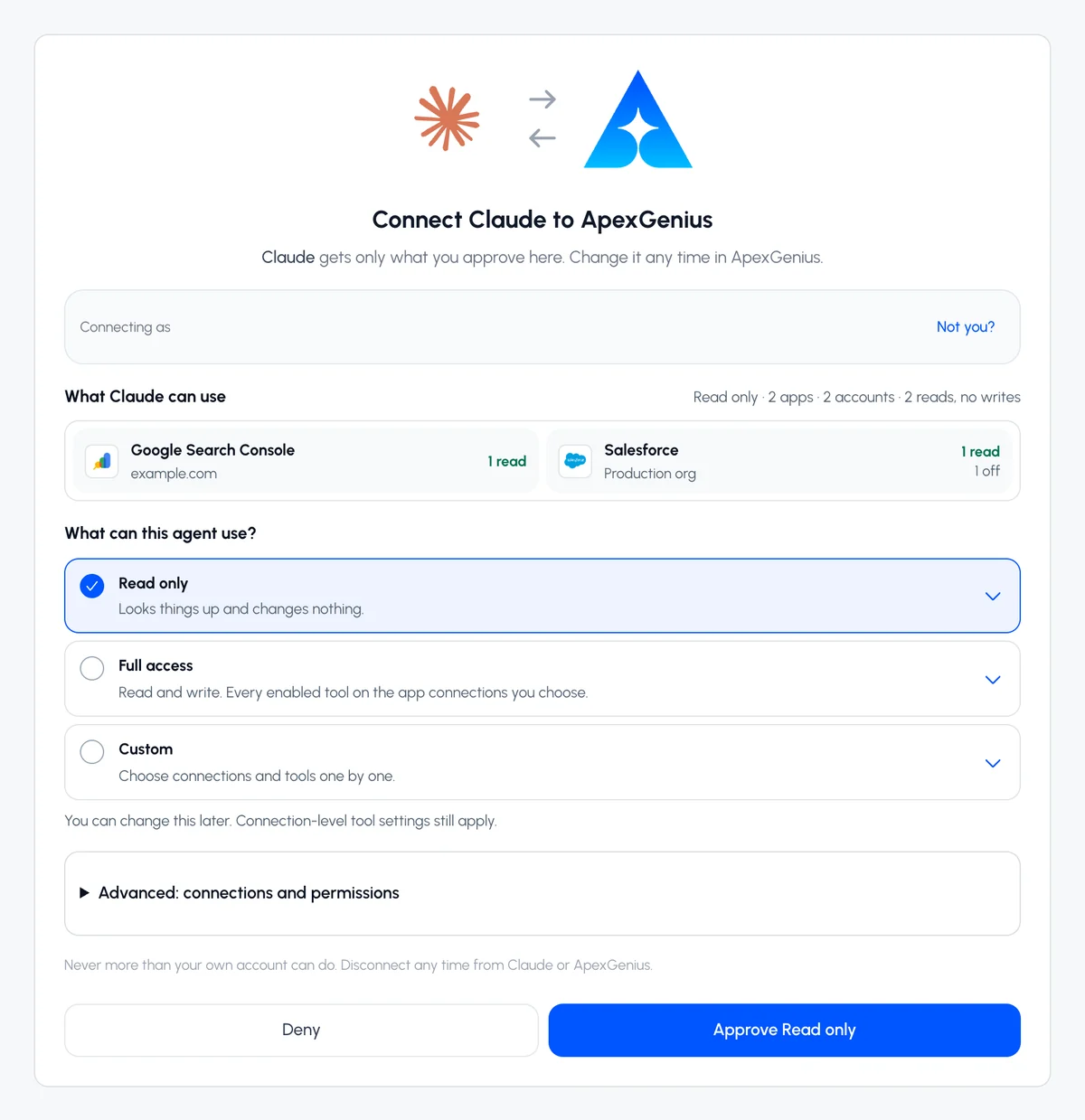
The ApexGenius authorization screen for Claude with the Full access, Read only, and Custom choices.
Approve access. ApexGenius opens its approval page. Choose Full access, Read only, or Custom, then approve.

Additional reference: the Salesforce setup guide.

Start free

What it looks like in Claude Cowork

An illustrative read-only request and response. Your results come from the account and dates you choose.

How the route works
Claude
Claude CoworkApexGenius MCP route
Which opportunities over 50k are closing this month and who owns them?
ApexGenius
Working with ApexGenius1 tool search · 2 reads
RequestOpen opportunities
Account scopeAuthorized connections checked
apex_search_toolsSalesforce records · Find the Salesforce read pathComplete
Salesforceapex_call_read_toolquery_soql · Query opportunities closing this monthComplete
Salesforceapex_call_read_toolquery_soql · Read owner namesComplete
Claude

Six opportunities over 50k close this month. Four belong to Priya Shah, two to Marcus Lee. The largest is Acme Renewal at 180k, stage Negotiation. Nothing was changed.

Read-only route
Claude Cowork

What you can ask once it is connected

Which opportunities over 50k are closing this month and who owns them?

Pull the Account trigger and explain what it changes.

Walk me through what happens when a Lead is converted in this org.

Which validation rules on Opportunity changed most recently?

You choose what Claude is allowed to touch

Choose the saved accounts and tools this Claude connection may use. Its authorization carries that scope, and each business connection’s tool and resource restrictions still apply.

  • Full accessEvery enabled tool on the connections you choose.
  • Read onlyLooks things up, changes nothing.
  • CustomPick apps and tools one by one.
  • · The selected Salesforce connection remains visible in the gateway workspace.
  • · Tool availability is resolved for the current connection and account context.
  • · Supported Salesforce write activity is recorded for review.
  • · Server-enforced Auto, Ask, and Off approval modes are in development.

The Salesforce operations Claude can run

21 operations: 11 Read and 10 Write. Available tools depend on your connection and permissions. Review any action that changes or removes data. Claude discovers these operations through the ApexGenius gateway.

  • list_projectsReadList accessible Salesforce connections and their environment details.
  • query_soqlReadRun SOQL and return selected Salesforce fields.
  • get_recordReadRetrieve one record by object type and ID.
  • list_objectsReadList accessible Salesforce objects.
  • describe_objectReadReturn fields, types, picklists, relationships, and permissions.
  • search_recordsReadSearch records across Salesforce objects.
  • read_fileReadRead one staged component or documentation file.
  • list_filesReadList staged or documentation files with an optional folder or pattern filter.
  • grepReadSearch staged file names or contents.
  • check_deploy_statusReadRead deployment status, component results, and test details.
  • list_live_metadataReadList live components of one metadata type in the selected org.
  • create_recordWriteCreate one Salesforce record.
  • write_fileWriteCreate or overwrite a Salesforce metadata component or Markdown document in private staging.
  • edit_fileWriteReplace exact matching content in a staged Salesforce metadata component or document.
  • cancel_deployWriteCancel an in-progress Salesforce deployment.
  • get_live_componentWritePull one live component into the private staging workspace.
  • update_recordWriteUpdate selected fields on one Salesforce record.
  • delete_recordWriteDelete one Salesforce record by ID.
  • execute_anonymous_apexWriteExecute supplied anonymous Apex, which can change or delete data.
  • delete_fileWritePermanently remove one staged component or documentation file.
  • deployWriteDeploy selected staged files with the requested Salesforce test level.

Questions people ask first

Which versions of Claude work with this?

Claude web, Claude Desktop, and Claude Cowork connect through the Connectors setting. Claude Code uses the same gateway through its own MCP setup.

Do I need a Claude paid plan?

Custom connectors are a Claude feature, so availability follows your Claude plan. The ApexGenius side is the same on every plan.

Do I need my own Salesforce connected app?

No. You sign in with Salesforce OAuth and ApexGenius holds the authorization for the connection, refreshing it as Salesforce requires.

Can I connect production and a sandbox at the same time?

Yes. Each org is its own Salesforce connection, and an AI agent can be scoped to one of them, both, or neither.

Can an agent delete records or deploy without me?

The operation must be enabled in the access you authorize. Choose Read only to exclude writes. Delete, anonymous Apex, and deploy carry risk labels; confirmation behavior depends on the tool and AI client, with no universal server-side human-approval guarantee.

Is my Salesforce data stored by ApexGenius?

The ordinary MCP path does not intentionally retain record results. Operational, connection, credential, usage, and audit data is retained so activity can be reviewed.

Which AI agents can use this connection?

Codex starts in Plugins in the ChatGPT desktop app. Claude, Claude Code, Cursor, VS Code, and ChatGPT Work each have their own setup guide. Authorize the saved Salesforce connection separately for each AI client; availability and controls vary.

Connect Salesforce to Claude today

Start free

7 days free. No card required. Disconnect any time.

One connection
Selected Salesforce connections
ClaudeClaude
ApexGeniusApexGenius
MCP
SalesforceProd org
SalesforceSandbox
SalesforceClient A
SalesforceClient B
SalesforceDev org

Managed Salesforce connection

Connect the org once. No Salesforce connection to babysit.

ApexGenius hosts the MCP connection, securely stores the Salesforce OAuth authorization, and refreshes routine access tokens automatically. You do not have to build a server or rebuild the connection every time a session expires.

What ApexGenius manages
  • No MCP server infrastructure for you to host or patch
  • Automatic Salesforce access-token refresh
  • The same authorized projects stay available across your ApexGenius MCP clients
  • A new login only when Salesforce revokes access or an org policy requires it

For Salesforce consultants and admins

Everyday questions first. Salesforce depth when the work needs it.

Use the selected Salesforce connection to answer a current business question, understand the configuration behind it, and move into reviewed record or metadata work without changing interfaces.

Find the component behind the current behavior

Metadata search across Apex, triggers, Flows, LWC, validation rules, objects, and fields, so Claude answers from your real org instead of guessing.

What touches Opportunity Stage, and in what order does it fire?

Answer live data questions

Claude writes and runs the SOQL for the question you actually asked, returning only the fields that matter.

Show open pipeline by stage and region, flagging deals with no next step.

Write the change, validate it, deploy it

Claude can draft Apex, Flows, or field changes against your actual schema, run a validate-only check with tests, and invoke the labeled deployment tool after any confirmation its client presents.

Add the validation rule we discussed, validate it, and deploy after I confirm.

Documentation that writes itself

Turn a messy inherited org into plain-English documentation of what each automation actually does.

Document the lead routing process end to end for a client handoff.

Setup

Connect Claude in four clear steps

Add the hosted route once, then choose the intended Salesforce connection for each task.

ApexGenius MCP server URL

https://server.autom8.pro/mcp
  1. 1

    Connect Salesforce to ApexGenius

    Create your ApexGenius account, add a project, and authorize the Salesforce org you want Claude to use. OAuth only, no password sharing.

  2. 2

    Add the connector in Claude

    In Claude, open Settings, choose Connectors, select Add custom connector, and paste the ApexGenius MCP server URL shown below.

  3. 3

    Sign in and approve

    Complete the ApexGenius sign-in when Claude prompts you. Claude reads the tool catalog so you can see exactly what the connection can do.

  4. 4

    Start asking

    Open a new chat and ask about your org. Claude selects from the available tools. Write and deployment tools are labeled so supported Claude clients can present confirmation, while server-side approval is not yet universal.

Prefer to watch it instead? Here is the 60-second setup walkthrough: Connect Claude to Salesforce in one minute.

ApexGenius MCP

Try it free on your own org

The full product for seven days with no credit card. When the trial ends, choose whether to subscribe for $25 per user each month to keep using ApexGenius with unlimited ApexGenius tool calls and no per-action connector fees.

Questions

Claude and Salesforce, answered

How do I connect Claude to Salesforce?

Create an ApexGenius account, connect your Salesforce org through OAuth, then in Claude open Settings, choose Connectors, and add a custom connector with the ApexGenius MCP server URL. Sign in when prompted and start asking in a new chat. Claude web, Claude Desktop, and Claude Cowork all support it.

Does Claude get my Salesforce password?

No. You authorize Salesforce on Salesforce’s own sign-in screen through OAuth. Claude calls declared ApexGenius tools, and Salesforce enforces the permissions of the credential configured for the selected project, including profiles, permission sets, and field-level security.

Do I have to reconnect Salesforce when an access token expires?

Normally, no. After you authorize the org once, ApexGenius uses the Salesforce refresh token to renew routine access tokens automatically. You only need to authorize again if Salesforce revokes the refresh token, you disconnect the org, or an administrator policy requires a fresh login.

What can Claude do once connected?

ApexGenius can discover 21 Salesforce operations without loading all 21 definitions into every prompt: find the Apex class, trigger, Flow, LWC, validation rule, object, or field behind behavior, read and explain it, run SOQL against live data, create and update records, edit metadata source, run anonymous Apex, validate with tests, and deploy through the Salesforce Metadata API.

Can Claude deploy changes to Salesforce?

Yes. Deployment is a labeled write action that runs through the standard Salesforce Metadata API with optional test runs, and a validate-only check is available first. Supported Claude clients can present confirmation for labeled write tools, but ApexGenius does not yet enforce a separate server-side approval token for every Salesforce mutation. Your Salesforce permissions still apply.

How many Salesforce orgs can I use from Claude?

Your signed-in Salesforce connection screen shows the current capacity for your account. Each org must be authorized with the Salesforce user whose permissions should apply.

Does it work with Claude Code, Cursor, or VS Code too?

ApexGenius has documented setup paths for Claude, Claude Code, Cursor, VS Code, Codex, and ChatGPT Work. Each client has its own transport, authorization, plan, and confirmation boundary, so verify the exact client rather than assuming identical behavior.