


Connect OpenClaw to Atlassian Rovo
Connect OpenClaw to Atlassian Rovo: 1. Connect Atlassian Rovo in ApexGenius. 2. Add the ApexGenius MCP server. 3. Start using Atlassian Rovo in OpenClaw.
1,000 free credits · No card required
How to connect Atlassian Rovo to OpenClaw
- 1Sign in to ApexGenius and connect Atlassian Rovo
- 2Add the ApexGenius MCP server to OpenClaw
- 3Start using Atlassian Rovo in OpenClaw
- 1
Connect Atlassian Rovo to ApexGenius
Allow ApexGenius in Atlassian Rovo
An admin allows ApexGenius for Atlassian Rovo first.
- 2
Connect ApexGenius to OpenClaw
Copy the MCP address
On Start, pick API key, open Manual setup, and copy the MCP address.
- 3
Approve access
ApexGenius opens its approval page. Review the access, then approve.
Add the ApexGenius MCP server to OpenClaw
OpenClaw saves outbound MCP servers under mcp.servers in its config. Add one from the terminal, or in the Control UI under Settings, then MCP.
- Run the command. To use the Control UI instead, open Settings, then MCP, then Add server, choose Streamable HTTP, enter the address, and set
authtooauthin the config editor on that page. - Sign in. In Settings, then MCP, choose Sign in for apexgenius and approve ApexGenius in your browser.
- From a terminal instead, stop the Gateway, run
openclaw mcp login apexgenius, follow the printed authorization URL, then start the Gateway again.
openclaw mcp add apexgenius \
  --url https://server.autom8.pro/mcp \
  --transport streamable-http \
  --auth oauth
Check it. Run openclaw mcp doctor apexgenius --probe. It checks the connection and lists available tools.
Steps follow OpenClaw documentation, Connect MCP servers (opens in a new tab), read November 12, 2026.
Then ask OpenClaw
Which Atlassian sites can my Atlassian Rovo connection reach? List each site and its apps. Do not search or change anything.
Written setup, step by stepShow
Before you start
- An Atlassian Cloud site with Jira or Confluence, and an Atlassian account that can read the work you need.
- An Atlassian organization admin who can change the Atlassian MCP server settings.
- Rovo credits in your Atlassian organization. Rovo search and Teamwork Graph reads can spend up to 10 Rovo credits a call from the shared pool.
1. Connect Atlassian Rovo to ApexGenius
- Ask an admin to allow ApexGenius. In Atlassian Administration, an organization admin selects Connectors, then Atlassian MCP server, chooses Add domain, and enters https://server.autom8.pro/**. Atlassian stops the sign-in until this is done. If your organization uses an IP allowlist, ask ApexGenius support for the address to add.
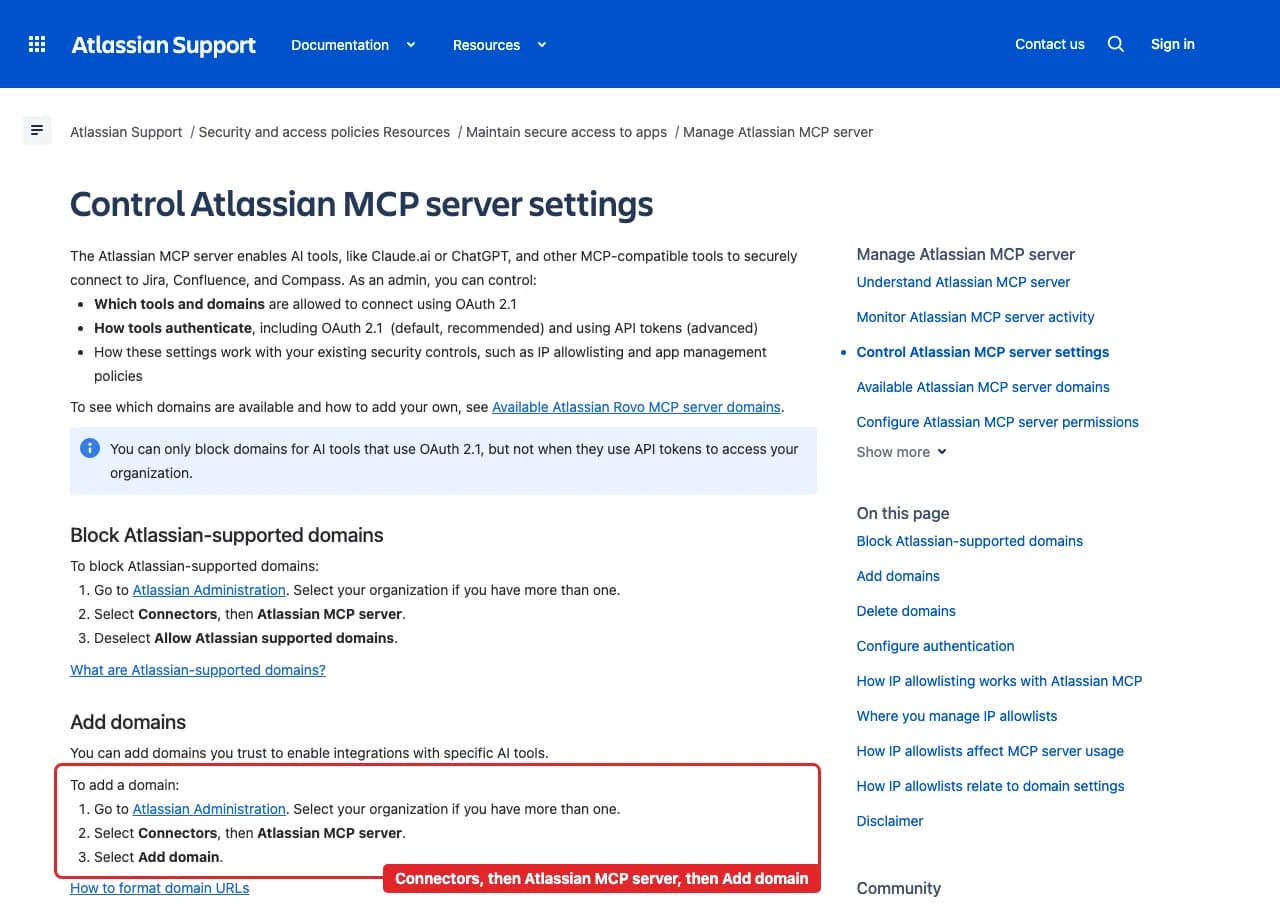
Atlassian's own admin guide: Atlassian Administration, Connectors, Atlassian MCP server, then Add domain. Enter https://server.autom8.pro/**. This is Atlassian's public support page, so no account appears in it.Open full-size image (opens in a new tab) - Open Atlassian Rovo in Connections. Choose Connect, or Add connection when offered. Give the connection a name if prompted.
- Choose the site and review access. Sign in to Atlassian in the browser, choose the site, and approve read access to Jira, Confluence, Rovo search and Teamwork Graph. No Atlassian API token is pasted into ApexGenius.
- Check the connection. Use Test connection and read the status. Add an AI agent from the AI agents page, choose Read only for the first test, and try the question below.
2. Connect ApexGenius to OpenClaw
Use this server address when adding the connection:
https://server.autom8.pro/mcpThe steps are above, under Add the ApexGenius MCP server to OpenClaw. These notes apply to OpenClaw only.
- Set the transport. When transport is left out, OpenClaw uses SSE. ApexGenius serves Streamable HTTP, so keep
--transport streamable-http. - Browser on another machine. If the browser cannot reach the callback, copy the code it returns and run
openclaw mcp login apexgenius --codewith that code. - If sign-in is needed again.
openclaw mcp status --verboseshows whether a server needs authorization. Until it is signed in, OpenClaw leaves that one server out of the agent’s tools instead of failing the turn. - Reloading.
openclaw mcp reloadrefreshes only the current CLI process. A Gateway running elsewhere needs its own reload or restart. - Access. When ApexGenius asks what OpenClaw may use, choose Read only for the first test, or Custom to limit it to the tools you need.
3. Try your first question
Which Atlassian sites can my Atlassian Rovo connection reach? List each site and its apps. Do not search or change anything.
Which Atlassian sites can my Atlassian Rovo connection reach? List each site and its apps. Do not search or change anything.Compare the sites with the one you chose on Atlassian's screen. Listing sites spends no Rovo credits and changes nothing.
Full guide: the Atlassian Rovo setup guide.
What it looks like in OpenClaw
apex_search_toolsAtlassian sites · Find the Atlassian Rovo read routeCompleteapex_call_read_toolgetAccessibleAtlassianResources · List the sites and appsCompleteOne site with Jira and Confluence, the one you chose at sign-in. Listing sites spent no Rovo credits.
Read-only routeWhat to ask OpenClaw about Atlassian Rovo
- Check the sites
Which Atlassian sites can my Atlassian Rovo connection reach? Do not search or change anything.
Runs
getAccessibleAtlassianResources(read). - Search across products
Find everything about the billing migration across Jira and Confluence, and show who owns the open work.
Runs
search(read), thengetTeamworkGraphContext(read). - Issue history
Show what changed on this Jira issue this week, from its change history and comments.
Runs
getJiraIssue(read), thenlistJiraIssueChangelogs(read), thenlistJiraIssueComments(read).
These 3 questions use 6 of Atlassian Rovo’s 59 operations. The full list is below.
- Compare the last two versions of this Confluence page and summarize what changed. (read)
What OpenClaw can do in Atlassian Rovo
59 operations: 59 read. Every operation looks things up and changes nothing, so OpenClaw cannot change Atlassian Rovo through ApexGenius.
Sites and account
2 readgetAccessibleAtlassianResourcesreadList the sites and apps this connection can reach, with the cloudId each tool needs.
atlassianUserInforeadRead the signed-in Atlassian account.
Search
3 readsearchreadSearch Jira, Confluence and connected apps in plain words with Rovo. Spends up to 10 Rovo credits a call.
searchJiraIssuesUsingJqlreadSearch Jira work items with JQL.
searchConfluencereadSearch Confluence content with CQL.
Teamwork Graph
2 readgetTeamworkGraphContextreadRead the relationships and linked objects around one Atlassian item. Spends up to 10 Rovo credits a call.
getTeamworkGraphObjectreadRead every field of one or more objects by ARI or URL. Spends up to 10 Rovo credits a call.
Jira work items
9 readgetJiraIssuereadRead a work item by ID or key.
listJiraIssueCommentsreadRead a work item's comments, a page at a time.
listJiraIssueChangelogsreadRead a work item's field-change history, oldest first.
listJiraIssueWorklogsreadRead the time logged on a work item.
listJiraIssueTransitionsreadList the workflow moves available for a work item.
listJiraIssueRemoteIssueLinksreadList a work item's web and remote links.
listJiraIssueLinkTypesreadList the link types on the site.
downloadJiraIssueAttachmentreadGet a short-lived download link for an attachment.
getJiraEntityPropertyreadRead a stored property on a work item, comment, worklog, dashboard item or user.
Jira spaces and setup
9 readlistJiraProjectsreadList the Jira spaces you can see.
listJiraProjectIssueTypesMetadatareadList the work item types in a space.
getJiraIssueTypeMetaWithFieldsreadRead the fields of one work item type.
listJiraStatusesreadList the possible work item statuses.
listJiraProjectComponentsreadList a space's components and their owners.
getJiraProjectVersionsreadRead a space's versions, or one version.
getJiraProjectVersionRelatedWorkreadRead the related work linked to a version.
listJiraFiltersreadFind saved filters and their JQL.
listJiraDashboardsreadList the dashboards you can see.
Jira boards and sprints
5 readlistJiraBoardsreadList the boards you can see.
getJiraBoardConfigreadRead a board's filter, columns and status mapping.
getJiraBoardIssueDatareadRead the work items on a board.
getJiraBoardSprintDatareadRead a board's sprint, the active one by default.
listJiraBoardSprintsreadList a board's sprints by state.
Jira people
4 readgetJiraCurrentUserreadRead the signed-in Jira user.
getJiraUserreadRead a user profile by account ID.
lookupJiraAccountIdreadFind an account ID by name or email.
listJiraIssueAssignableUsersreadList the people who can be assigned in a space or work item.
Confluence pages and spaces
9 readgetConfluenceContentreadRead a page, blog post, whiteboard, database or other content.
listConfluenceContentreadList one content type in a space.
resolveConfluenceContentMacrosreadRead a page with its macros resolved to HTML.
exportConfluenceContentreadExport content as PDF or Word.
getConfluenceMauiAppreadRead the source of a page's interactive visualization.
listConfluenceSpacesreadList the spaces you can open.
getConfluenceSpacereadRead a space and its content types.
getConfluenceSpaceInstructionsreadRead a space's instructions.
getConfluencePersonalSpacereadRead your personal space.
Confluence history
3 readlistConfluenceContentVersionsreadList a page's versions.
getConfluenceContentVersionreadRead one earlier version.
diffConfluenceContentVersionsreadCompare two versions of a page.
Confluence comments, tasks and reactions
5 readlistConfluenceCommentsreadList the comments on a page or blog post.
getConfluenceCommentreadRead one comment.
listConfluenceTasksreadList inline tasks.
getConfluenceTaskreadRead one inline task.
getConfluenceReactionsreadList the emoji reactions on content.
Confluence attachments and templates
5 readlistConfluenceAttachmentsreadList a page's attachments.
getConfluenceAttachmentreadRead one attachment's details.
downloadConfluenceAttachmentreadGet a download link for an attachment.
listConfluenceTemplatesreadList templates and blueprints.
getConfluenceTemplatereadRead a template's body.
Confluence access
3 readgetConfluenceContentPermissionsreadList the people and groups granted access to content.
getConfluenceContentRestrictionStatereadRead whether content is open, edit restricted or view restricted.
getConfluencePublicLinkStatusreadRead whether a public link is on.
You choose the access. When you approve OpenClaw, pick Full access, Read only, or Custom.
Atlassian sets the boundary. One connection covers the Atlassian site you choose at sign-in and sees only what that Atlassian account can see.
ApexGenius asks Atlassian for read and search scopes only, and reads use a route that checks Atlassian's own read-only label before every call. Jira and Confluence changes use the Jira and Confluence connectors.
Rovo search and Teamwork Graph calls can spend up to 10 Rovo credits each from your organization's shared pool. Listing sites spends none.
An Atlassian organization admin allows https://server.autom8.pro/** in Atlassian Administration under Connectors, then Atlassian MCP server, before anyone can connect. Removing it blocks new connections.
Disconnecting stops future gateway access. A refresh token unused for 90 days expires, and you connect again.
Questions about connecting OpenClaw to Atlassian Rovo
Updated November 12, 2026.
How do I connect OpenClaw to Atlassian Rovo?
Connect OpenClaw to Atlassian Rovo through ApexGenius in three steps, once an Atlassian organization admin has added https://server.autom8.pro/** under Connectors, then Atlassian MCP server. Sign in to ApexGenius and connect Atlassian Rovo by signing in to Atlassian and choosing your site. In OpenClaw, run openclaw mcp add apexgenius --url https://server.autom8.pro/mcp --transport streamable-http --auth oauth, then sign in from Settings, then MCP. Then ask OpenClaw which Atlassian sites it can reach.
How do I check that OpenClaw can use Atlassian Rovo?
Run openclaw mcp doctor apexgenius --probe. It opens a live connection and lists what the server offers. If openclaw mcp status --verbose reports that authorization is required, sign in again from Settings, then MCP, or with openclaw mcp login apexgenius. Then ask: “Which Atlassian sites can my Atlassian Rovo connection reach? List each site and its apps. Do not search or change anything.”
Is there an Atlassian Rovo MCP server for OpenClaw?
Yes. Atlassian runs the Rovo MCP server, and ApexGenius connects to it for you. OpenClaw connects to ApexGenius once and reaches 59 Atlassian Rovo operations, so OpenClaw does not need a separate Atlassian integration. You set it up one time and add each agent the same way.
What can OpenClaw do in Atlassian Rovo once it is connected?
OpenClaw can run 59 Atlassian Rovo reads through ApexGenius: Rovo search across Jira, Confluence and connected apps, Teamwork Graph links between work, people and goals, Jira issues, boards, sprints and history, and Confluence pages, comments, versions and attachments.
Can OpenClaw change Jira issues or Confluence pages through Rovo?
No. The Atlassian Rovo connection holds read and search scopes only, so Atlassian refuses changes. To let OpenClaw create or update issues and pages, connect the Jira and Confluence connectors in ApexGenius too.
Does OpenClaw spend Rovo credits?
Some calls do. Rovo search and the two Teamwork Graph reads can spend up to 10 Rovo credits a call from your organization's shared pool. Listing sites and reading an issue or page by key are ordinary reads. Ask OpenClaw for a JQL or CQL search when you know the exact filter.
Can I use the same Atlassian Rovo connection with Claude, ChatGPT, Grok Bot or Muse?
Yes. One Atlassian Rovo connection in ApexGenius works with every compatible agent you add, including Claude, ChatGPT, Grok Bot or Muse. Each agent gets its own short setup, and the AtlassianRovo skill loads in all of them.
More connections like this one
OpenClaw with other apps
 Mobbin
 Slack
 Discord
 Context.dev
 Notion
 Google Meet
 Gmail
 Google Chat
All 50 apps OpenClaw can use
 Google Docs
 Google Drive
 Google Slides
 Polymarket
 OP.GG
 Confluence
 Microsoft Outlook
 Supabase
 Cal.com
 ChatGPT Ads
 GitHub
 Stripe
 Attio
 Semrush
 Apify
 Linear
 Jira
 HQ Rental
 Google Ads
 Google Analytics
 Google Forms
 Google Tasks
 Google Calendar
 Google Sheets
 Apollo
 Blotato
 Bing Webmaster
 Calendly
 ClickUp
 monday.com
 YouTube
- YouTube Analytics
 Salesforce
 n8n
 Google Search Console
 ElevenLabs
 FreshBooks
 Trello
 GitLab
 TypeSafe
 HubSpot
- Outlook Calendar
Other agents with Atlassian Rovo
 Claude
 Grok Bot
 Muse
Connect Atlassian Rovo to OpenClaw today
Start free1,000 free credits. No card required. Disconnect any time.