


Connect OpenClaw to Blotato
Connect OpenClaw to Blotato in 3 steps: 1. Sign in to ApexGenius and connect Blotato. 2. Add the ApexGenius MCP server. 3. Start using Blotato in OpenClaw.
1,000 free credits · No card required
How to connect Blotato to OpenClaw
- 1Sign in to ApexGenius and connect Blotato
- 2Add the ApexGenius MCP server to OpenClaw
- 3Start using Blotato in OpenClaw
- 1
Connect Blotato to ApexGenius
Connect Blotato
Create an API key in Blotato. You paste it into ApexGenius once.
- 2
Connect ApexGenius to OpenClaw
Copy the MCP address
On Start, pick API key, open Manual setup, and copy the MCP address.
- 3
Approve access
ApexGenius opens its approval page. Review the access, then approve.
Add the ApexGenius MCP server to OpenClaw
OpenClaw saves outbound MCP servers under mcp.servers in its config. Add one from the terminal, or in the Control UI under Settings, then MCP.
- Run the command. To use the Control UI instead, open Settings, then MCP, then Add server, choose Streamable HTTP, enter the address, and set
authtooauthin the config editor on that page. - Sign in. In Settings, then MCP, choose Sign in for apexgenius and approve ApexGenius in your browser.
- From a terminal instead, stop the Gateway, run
openclaw mcp login apexgenius, follow the printed authorization URL, then start the Gateway again.
openclaw mcp add apexgenius \
  --url https://server.autom8.pro/mcp \
  --transport streamable-http \
  --auth oauth
Check it. Run openclaw mcp doctor apexgenius --probe. It checks the connection and lists available tools.
Steps follow OpenClaw documentation, Connect MCP servers (opens in a new tab), read November 12, 2026.
Then ask OpenClaw
List the social accounts connected to my Blotato account. Do not post, schedule, message, or spend credits.
Written setup, step by stepShow
Before you start
- A paid Blotato subscription with API access. Blotato says creating an API key ends its free trial and starts the paid plan.
- The social accounts you want to use already connected in Blotato.
1. Connect Blotato to ApexGenius
- Copy your API key in Blotato. In Blotato open Settings, then API, and choose Copy API Key. Keep the key private.
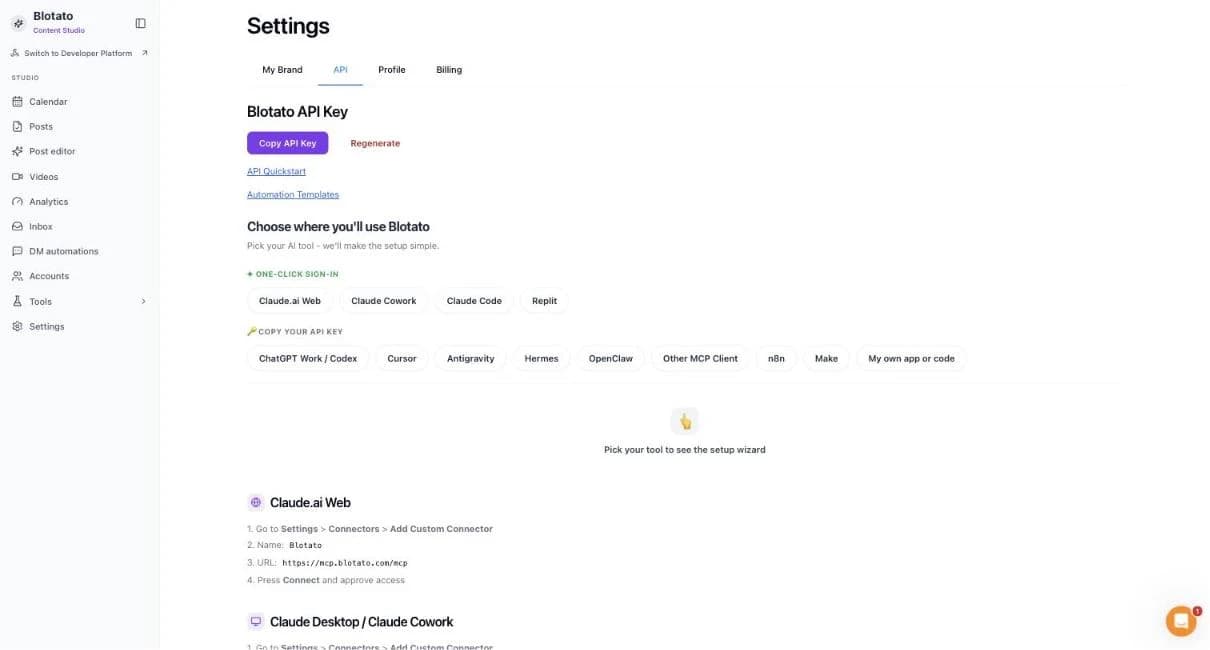
Settings, then API. Copy API Key puts your key on the clipboard without showing it on screen.Open full-size image (opens in a new tab) - Open Blotato in Connections. Choose Connect or Add connection.
- Enter the API key. Paste the key from Blotato. ApexGenius supplies the server address and checks the key against your Blotato account.
- Check the saved connection. Save after validation succeeds. Review the Tools tab. Publishing, messages, automations, deletes and credit actions run when called.
2. Connect ApexGenius to OpenClaw
Use this server address when adding the connection:
https://server.autom8.pro/mcpThe steps are above, under Add the ApexGenius MCP server to OpenClaw. These notes apply to OpenClaw only.
- Set the transport. When transport is left out, OpenClaw uses SSE. ApexGenius serves Streamable HTTP, so keep
--transport streamable-http. - Browser on another machine. If the browser cannot reach the callback, copy the code it returns and run
openclaw mcp login apexgenius --codewith that code. - If sign-in is needed again.
openclaw mcp status --verboseshows whether a server needs authorization. Until it is signed in, OpenClaw leaves that one server out of the agent’s tools instead of failing the turn. - Reloading.
openclaw mcp reloadrefreshes only the current CLI process. A Gateway running elsewhere needs its own reload or restart. - Access. When ApexGenius asks what OpenClaw may use, choose Read only for the first test, or Custom to limit it to the tools you need.
3. Try your first question
List the social accounts connected to my Blotato account. Do not post, schedule, message, or spend credits.
List the social accounts connected to my Blotato account. Do not post, schedule, message, or spend credits.Compare the accounts with the Accounts page in Blotato. Listing accounts publishes nothing and spends no credits.
Full guide: the Blotato setup guide.
What it looks like in OpenClaw
apex_search_toolsBlotato accounts · Find Blotato toolsCompleteapex_call_write_toolblotato_list_accounts · List connected accountsCompleteFour accounts are connected, LinkedIn, Instagram, X and a Facebook page. Nothing was posted or changed.
Read-only routeWhat to ask OpenClaw about Blotato
- Check the accounts
List my connected social accounts in Blotato. Do not post anything.
Runs
blotato_list_accounts(read). - Best posts
Which of my posts did best last month?
Runs
blotato_list_top_posts(read). - This week
What is scheduled to go out this week?
Runs
blotato_list_schedules(read).
These 3 questions use 3 of Blotato’s 35 operations. The full list is below.
- Schedule this post for LinkedIn on Tuesday at 9. Show me the post first. (write)
What OpenClaw can do in Blotato
35 operations: 23 read, 12 write. Read looks things up and changes nothing. Writes change Blotato and run only when you turn them on.
Account
4 readblotato_get_userreadRead your Blotato profile and plan.
blotato_get_creditsreadRead your remaining Blotato credits.
blotato_list_accountsreadList the social accounts connected to Blotato.
blotato_list_pinterest_boardsreadList the boards on a connected Pinterest account.
Posts
4 read · 3 writeblotato_create_postwritePublish a post to a connected account, or schedule it. Published posts are public.
blotato_get_post_statusreadCheck whether a post published.
blotato_list_postsreadList your scheduled, published and failed posts.
blotato_list_schedulesreadList your scheduled posts.
blotato_get_schedulereadRead one scheduled post.
blotato_update_schedulewriteChange a scheduled post’s content or time.
blotato_delete_schedulewriteDelete a scheduled post. It cannot be undone.
Results
2 readblotato_get_post_analyticsreadRead a published post’s results over time.
blotato_list_top_postsreadList your best posts by the measure you choose.
Content and visuals
3 read · 3 writeblotato_create_sourcewritePull and summarize content from a link, a YouTube video or text.
blotato_get_source_statusreadCheck a source that is still being read.
blotato_list_visual_templatesreadList the visual templates you can use.
blotato_create_visualwriteMake an image, infographic, carousel, slideshow or video from a template. Uses credits.
blotato_get_visual_statusreadCheck a visual that is still being made.
blotato_create_presigned_upload_urlwriteGet a link to upload a file of your own.
Comments and messages
6 read · 2 writeblotato_list_commentsreadList comments on your posts.
blotato_get_commentreadRead one comment.
blotato_post_commentwritePost a comment or reply on Instagram or Facebook.
blotato_list_conversationsreadList your direct message conversations.
blotato_get_conversationreadRead one conversation.
blotato_list_messagesreadList direct messages.
blotato_get_messagereadRead one direct message.
blotato_send_messagewriteSend a direct message on Facebook or Instagram.
DM automations
4 read · 4 writeblotato_list_automationsreadList your DM automations.
blotato_create_automationwriteCreate a DM automation that messages people when it is triggered.
blotato_update_automationwriteChange a DM automation.
blotato_update_automation_triggerwriteTurn one trigger on or off. It takes effect right away.
blotato_delete_automationwriteArchive a DM automation so it stops sending.
blotato_get_automation_analyticsreadRead a DM automation’s results.
blotato_list_automation_runsreadList a DM automation’s runs.
blotato_list_automation_logsreadRead a DM automation’s logs.
You choose the access. When you approve OpenClaw, pick Full access, Read only, or Custom.
The API key decides which Blotato account, social accounts and credits can be used.
Published posts, comments and direct messages are public or reach real people right away. Making visuals uses Blotato credits.
Writes run immediately. Blocked hides a tool from agents.
Disconnecting stops future access. It does not take down a published post or a sent message.
Questions about connecting OpenClaw to Blotato
Updated November 12, 2026.
How do I connect OpenClaw to Blotato?
Sign in to ApexGenius and connect Blotato. In OpenClaw, run openclaw mcp add apexgenius --url https://server.autom8.pro/mcp --transport streamable-http --auth oauth, then sign in from Settings, then MCP. Then ask OpenClaw: “List the social accounts connected to my Blotato account. Do not post, schedule, message, or spend credits.” Start with a read, so nothing changes.
How do I check that OpenClaw can use Blotato?
Run openclaw mcp doctor apexgenius --probe. It opens a live connection and lists what the server offers. If openclaw mcp status --verbose reports that authorization is required, sign in again from Settings, then MCP, or with openclaw mcp login apexgenius. Then ask: “List the social accounts connected to my Blotato account. Do not post, schedule, message, or spend credits.”
Can my AI publish posts?
Yes. It can publish now or schedule for later, and published posts are public. Writes run immediately. Blocked hides a tool from agents.
Can my AI reply to comments and messages?
Yes, on Instagram and Facebook. Replies and messages reach people right away.
Does it use Blotato credits?
Making visuals uses Blotato credits. Ask your AI to check your credits first.
Will this list of tools change?
Blotato publishes its MCP tools, and ApexGenius reads Blotato’s live list on every search. This page shows the list as of its review date.
More connections like this one
OpenClaw with other apps
 ChatGPT Ads
 Semrush
 Google Ads
 Google Analytics
 Bing Webmaster
 YouTube
- YouTube Analytics
 Google Search Console
All 50 apps OpenClaw can use
 TypeSafe
 Supabase
 Mobbin
 Cal.com
 Slack
 Discord
 GitHub
 Stripe
 Context.dev
 Attio
 Notion
 Apify
 Linear
 Jira
 HQ Rental
 Google Forms
 Google Meet
 Google Tasks
 Gmail
 Google Calendar
 Google Chat
 Google Docs
 Google Drive
 Google Sheets
 Google Slides
 Apollo
 Calendly
 ClickUp
 monday.com
 Atlassian Rovo
 Polymarket
 OP.GG
 Salesforce
 n8n
 Confluence
 ElevenLabs
 FreshBooks
 Trello
 GitLab
 HubSpot
 Microsoft Outlook
- Outlook Calendar
 Claude
 Grok Bot
 Muse
Connect Blotato to OpenClaw today
Start free1,000 free credits. No card required. Disconnect any time.