


Connect OpenClaw to OP.GG
Connect OpenClaw to OP.GG in 3 steps: 1. Sign in to ApexGenius and connect OP.GG. 2. Add the ApexGenius MCP server. 3. Start using OP.GG in OpenClaw.
1,000 free credits · No card required
How to connect OP.GG to OpenClaw
- 1Sign in to ApexGenius and connect OP.GG
- 2Add the ApexGenius MCP server to OpenClaw
- 3Start using OP.GG in OpenClaw
- 1
Connect OP.GG to ApexGenius
Open OP.GG in ApexGenius
Open OP.GG in Connections and choose Connect.
- 2
Connect ApexGenius to OpenClaw
Copy the MCP address
On Start, pick API key, open Manual setup, and copy the MCP address.
- 3
Approve access
ApexGenius opens its approval page. Review the access, then approve.
Add the ApexGenius MCP server to OpenClaw
OpenClaw saves outbound MCP servers under mcp.servers in its config. Add one from the terminal, or in the Control UI under Settings, then MCP.
- Run the command. To use the Control UI instead, open Settings, then MCP, then Add server, choose Streamable HTTP, enter the address, and set
authtooauthin the config editor on that page. - Sign in. In Settings, then MCP, choose Sign in for apexgenius and approve ApexGenius in your browser.
- From a terminal instead, stop the Gateway, run
openclaw mcp login apexgenius, follow the printed authorization URL, then start the Gateway again.
openclaw mcp add apexgenius \
  --url https://server.autom8.pro/mcp \
  --transport streamable-http \
  --auth oauth
Check it. Run openclaw mcp doctor apexgenius --probe. It checks the connection and lists available tools.
Steps follow OpenClaw documentation, Connect MCP servers (opens in a new tab), read November 12, 2026.
Then ask OpenClaw
Show the current Worlds match schedule from OP.GG. Include teams or TBD, match times with timezone, status and source links. Say when the data was checked.
Written setup, step by stepShow
Before you start
- An ApexGenius account.
- No OP.GG login, Riot password or API key is needed.
1. Connect OP.GG to ApexGenius
- Open OP.GG in Connections. Sign in to ApexGenius, open Connections and choose OP.GG.
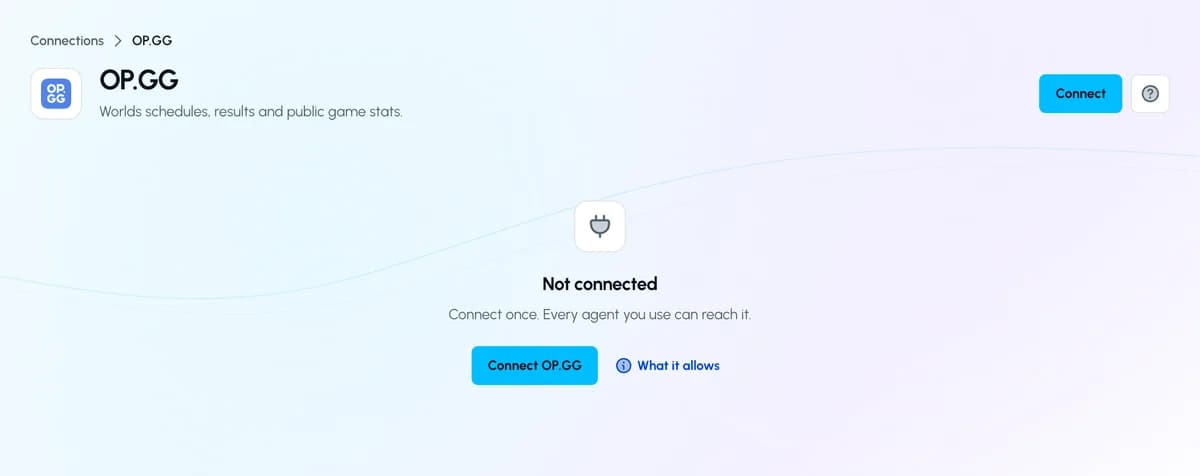
The OP.GG page before you connect. Choose Connect; there is no sign-in or key to enter.Open full-size image (opens in a new tab) - Connect public game data. Choose Connect. ApexGenius checks OP.GG’s official service and saves the connection. There are no keys to enter.
- Review tools and AI access. Keep the public data service and the read tools on. Add ApexGenius to a compatible AI agent and choose its access.
- Try a Worlds question. Read the OPGG skill, ask the question below and check the source links and Tool Activity.
2. Connect ApexGenius to OpenClaw
Use this server address when adding the connection:
https://server.autom8.pro/mcpThe steps are above, under Add the ApexGenius MCP server to OpenClaw. These notes apply to OpenClaw only.
- Set the transport. When transport is left out, OpenClaw uses SSE. ApexGenius serves Streamable HTTP, so keep
--transport streamable-http. - Browser on another machine. If the browser cannot reach the callback, copy the code it returns and run
openclaw mcp login apexgenius --codewith that code. - If sign-in is needed again.
openclaw mcp status --verboseshows whether a server needs authorization. Until it is signed in, OpenClaw leaves that one server out of the agent’s tools instead of failing the turn. - Reloading.
openclaw mcp reloadrefreshes only the current CLI process. A Gateway running elsewhere needs its own reload or restart. - Access. When ApexGenius asks what OpenClaw may use, choose Read only for the first test, or Custom to limit it to the tools you need.
3. Try your first question
Show the current Worlds match schedule from OP.GG. Include teams or TBD, match times with timezone, status and source links. Say when the data was checked.
Show the current Worlds match schedule from OP.GG. Include teams or TBD, match times with timezone, status and source links. Say when the data was checked.Compare the competition and start times with the linked OP.GG schedule.
Full guide: the OP.GG setup guide.
What it looks like in OpenClaw

apex_call_read_toolsalesforce_read · Find matching recordsCompleteapex_call_read_toolsalesforce_read · Read related activityComplete
apex_call_read_tooln8n_get_workflow · Check workflow statusCompleteThree safe example reads returned results.
Read-only routeTry asking
Show the current Worlds match schedule from OP.GG. Include teams or TBD, match times with timezone, status and source links. Say when the data was checked.
Show the five latest completed Worlds matches from OP.GG, with scores and source links.
Read Ahri’s current mid-lane statistics for the rank I name. Show the patch and sample size when supplied.
Show recent public League matches for the Riot ID and region I provide. Keep solo-queue results separate from pro tournament results.
What OpenClaw can do in OP.GG
29 operations: 29 read. Every operation looks things up and changes nothing, so OpenClaw cannot change OP.GG through ApexGenius.
League esports
2 readlol_esports_list_schedulesreadRead match schedules and recent results, including Worlds.
lol_esports_list_team_standingsreadRead current team standings for a league.
League players
4 readlol_get_pro_player_riot_idreadFind a pro player’s public Riot ID in a region.
lol_get_summoner_profilereadRead a player’s rank, profile and champion pool.
lol_list_summoner_matchesreadRead recent public match history for a Riot ID.
lol_get_summoner_game_detailreadRead the players and stats in one public match.
League champions
7 readlol_get_champion_analysisreadRead champion win, pick and ban rates with builds.
lol_get_champion_synergiesreadRead champion synergy data for selected roles.
lol_get_lane_matchup_guidereadRead a lane matchup guide for two champions.
lol_list_champion_detailsreadRead champion abilities, tips, lore and base stats.
lol_list_champion_leaderboardreadRead a champion leaderboard for a region.
lol_list_championsreadRead the champion catalog.
lol_list_lane_meta_championsreadRead champion statistics and tiers by lane.
League items and skins
4 readlol_list_aram_augmentsreadRead ARAM augment details.
lol_list_discounted_skinsreadRead current skin sale information. Makes no purchase.
lol_list_itemsreadRead game item names, costs and stats.
lol_list_skin_stats_for_championreadRead skin statistics for one champion.
Teamfight Tactics
6 readtft_get_champion_item_buildreadRead item builds for a TFT champion.
tft_get_play_stylereadRead public TFT play-style data for a player.
tft_list_augmentsreadRead TFT augments and their descriptions.
tft_list_champions_for_itemreadRead TFT champions associated with an item.
tft_list_item_combinationsreadRead TFT item recipes.
tft_list_meta_decksreadRead current TFT compositions and stats.
Valorant
6 readvalorant_list_agent_compositions_for_mapreadRead agent compositions for a Valorant map.
valorant_list_agent_statisticsreadRead Valorant agent statistics.
valorant_list_agentsreadRead agent abilities, roles and metadata.
valorant_list_leaderboardreadRead a regional Valorant leaderboard.
valorant_list_mapsreadRead Valorant map metadata.
valorant_list_player_matchesreadRead public Valorant match history for a Riot ID.
You choose the access. When you approve OpenClaw, pick Full access, Read only, or Custom.
The connection reaches OP.GG’s official public MCP. It does not sign in to a game account.
Only reviewed reads are offered. New tools and changed input schemas need a review before they can run.
Worlds and LCS are separate competitions. Solo-queue statistics are not professional match statistics.
Current esports tools have no season or year filter. Keep unknown teams, empty results and source freshness explicit.
Disconnecting stops future ApexGenius calls. It does not change public OP.GG data.
Questions about connecting OpenClaw to OP.GG
Updated November 12, 2026.
How do I connect OpenClaw to OP.GG?
Sign in to ApexGenius and connect OP.GG. In OpenClaw, run openclaw mcp add apexgenius --url https://server.autom8.pro/mcp --transport streamable-http --auth oauth, then sign in from Settings, then MCP. Then ask OpenClaw: “Show the current Worlds match schedule from OP.GG. Include teams or TBD, match times with timezone, status and source links. Say when the data was checked.” Start with a read, so nothing changes.
How do I check that OpenClaw can use OP.GG?
Run openclaw mcp doctor apexgenius --probe. It opens a live connection and lists what the server offers. If openclaw mcp status --verbose reports that authorization is required, sign in again from Settings, then MCP, or with openclaw mcp login apexgenius. Then ask: “Show the current Worlds match schedule from OP.GG. Include teams or TBD, match times with timezone, status and source links. Say when the data was checked.”
Is OP.GG available in ApexGenius?
Yes. Choose Connect in Connections. No OP.GG login, Riot password or API key is needed.
Do I need an OP.GG API key?
No. This connection uses OP.GG’s public MCP service. It asks for no OP.GG login, Riot password or API key.
Which games does the connection cover?
The reviewed tools cover League of Legends, Teamfight Tactics and Valorant. The tool index shows the exact reads for each game.
Can I read Worlds schedules and results?
The schedule tool supports Worlds, recent completed results and a team filter. It has no year or season selector. It does not provide a complete historical professional-game dataset.
Can this connection place bets or buy skins?
No. All tools read data. They cannot place bets, make payments, buy skins, send messages or change a game account.
Can I use the connection with different AI agents?
Yes. Each compatible agent needs its own ApexGenius setup and access. The OPGG skill is available for the agent to read; it does not grant permissions.
More connections like this one
OpenClaw with other apps
 Mobbin
 Slack
 Discord
 Context.dev
 Notion
 Google Meet
 Gmail
 Google Chat
All 50 apps OpenClaw can use
 Google Docs
 Google Drive
 Google Slides
 Atlassian Rovo
 Polymarket
 Confluence
 Microsoft Outlook
 Supabase
 Cal.com
 ChatGPT Ads
 GitHub
 Stripe
 Attio
 Semrush
 Apify
 Linear
 Jira
 HQ Rental
 Google Ads
 Google Analytics
 Google Forms
 Google Tasks
 Google Calendar
 Google Sheets
 Apollo
 Blotato
 Bing Webmaster
 Calendly
 ClickUp
 monday.com
 YouTube
- YouTube Analytics
- Salesforce
- n8n
 Google Search Console
 ElevenLabs
 FreshBooks
 Trello
 GitLab
 TypeSafe
 HubSpot
- Outlook Calendar
 Claude
 Grok Bot
 Muse
Connect OP.GG to OpenClaw today
Start free1,000 free credits. No card required. Disconnect any time.