


Connect Muse to OP.GG
Connect Muse to OP.GG in 3 steps: 1. Sign in to ApexGenius and connect OP.GG. 2. Add the ApexGenius connector. 3. Start using OP.GG in Muse.
1,000 free credits · No card required
How to connect OP.GG to Muse
- 1Sign in to ApexGenius and connect OP.GG
- 2Add the ApexGenius connector to Muse
- 3Start using OP.GG in Muse
- 1
Connect OP.GG to ApexGenius
Open OP.GG in ApexGenius
Open OP.GG in Connections and choose Connect.
- 2
Connect ApexGenius to Muse
Choose Muse
Back on Start, pick Muse and copy the prompt.
- 3
Add it in Muse
In Muse, ask it to connect ApexGenius. Choose Connect on the card.
- 4
Approve access
ApexGenius opens its approval page. Review the access, then approve.
Then ask Muse
Show the current Worlds match schedule from OP.GG. Include teams or TBD, match times with timezone, status and source links. Say when the data was checked.
Written setup, step by stepShow
Before you start
- An ApexGenius account.
- No OP.GG login, Riot password or API key is needed.
1. Connect OP.GG to ApexGenius
- Open OP.GG in Connections. Sign in to ApexGenius, open Connections and choose OP.GG.
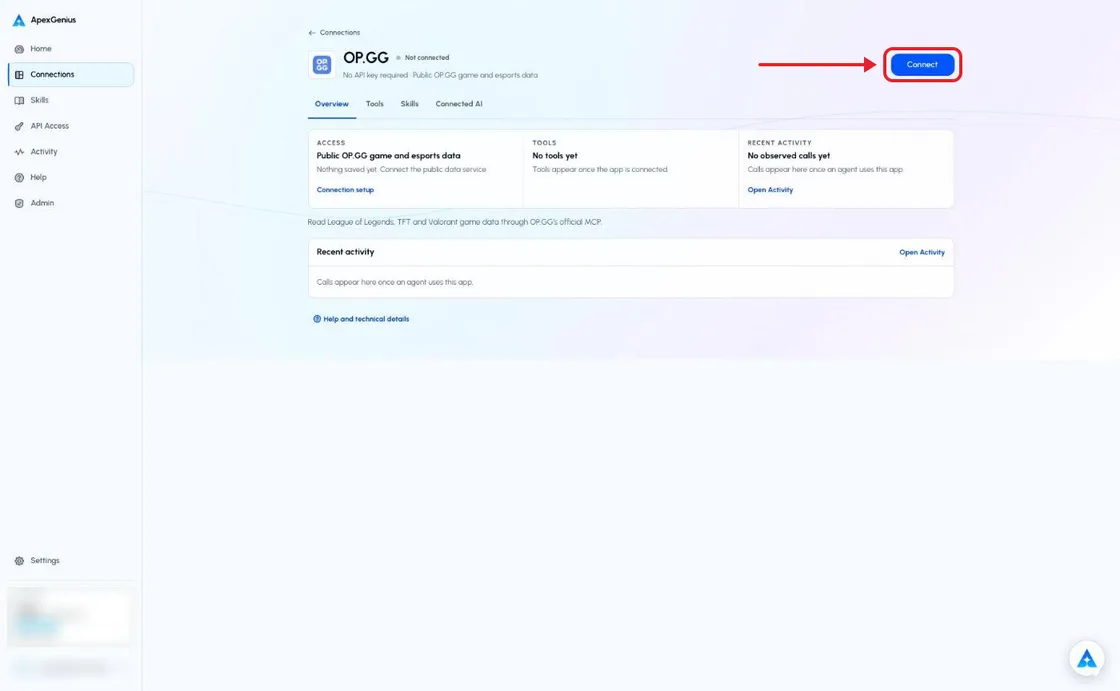
The OP.GG connection page before you connect. Choose Connect; there is no sign-in or key to enter. The account email and credits are blurred in this capture.Open full-size image (opens in a new tab) - Connect public game data. Choose Connect. ApexGenius checks OP.GG’s official service and saves the connection. There are no keys to enter.
- Review tools and AI access. Keep the public data service and the read tools on. Add ApexGenius to a compatible AI agent and choose its access.
- Try a Worlds question. Read the OPGG skill, ask the question below and check the source links and Tool Activity.
2. Connect ApexGenius to Muse
Use this server address when adding the connection:
https://server.autom8.pro/mcp- In Muse, ask it to connect ApexGenius and paste the Muse setup prompt from ApexGenius. Muse shows an ApexGenius connector card. Choose Connect, then sign in to ApexGenius and approve access in your browser.
- When ApexGenius asks what this AI client may use, choose Read only for the first test, or Custom to limit it to the tools you need.
- Start a new conversation and select ApexGenius from the available tools before asking for live data.
3. Verify one safe read
Show the current Worlds match schedule from OP.GG. Include teams or TBD, match times with timezone, status and source links. Say when the data was checked.
Show the current Worlds match schedule from OP.GG. Include teams or TBD, match times with timezone, status and source links. Say when the data was checked.Compare the competition and match times with the linked OP.GG pages. A returned schedule proves that read, not every game or historical season. Empty results and missing teams must stay explicit.
Full guide: the OP.GG setup guide.
What it looks like in Muse
Illustration of a task, not a recorded customer result. Your answers come from the account and dates you choose.

apex_call_read_toolsalesforce_read · Find matching recordsCompleteapex_call_read_toolsalesforce_read · Read related activityComplete
apex_call_read_tooln8n_get_workflow · Check workflow statusCompleteThree safe example reads returned results. Nothing was changed.
Read-only routeTry asking
Show the current Worlds match schedule from OP.GG. Include teams or TBD, match times with timezone, status and source links. Say when the data was checked.
Show the five latest completed Worlds matches from OP.GG, with scores and source links.
Read Ahri’s current mid-lane statistics for the rank I name. Show the patch and sample size when supplied.
Show recent public League matches for the Riot ID and region I provide. Keep solo-queue results separate from pro tournament results.
What Muse can do in OP.GG
29 operations: 29 read. Every operation looks things up and changes nothing, so Muse cannot change OP.GG through ApexGenius.
League esports
2 readlol_esports_list_schedulesreadRead match schedules and recent results, including Worlds.
lol_esports_list_team_standingsreadRead current team standings for a league.
League players
4 readlol_get_pro_player_riot_idreadFind a pro player’s public Riot ID in a region.
lol_get_summoner_profilereadRead a player’s rank, profile and champion pool.
lol_list_summoner_matchesreadRead recent public match history for a Riot ID.
lol_get_summoner_game_detailreadRead the players and stats in one public match.
League champions
7 readlol_get_champion_analysisreadRead champion win, pick and ban rates with builds.
lol_get_champion_synergiesreadRead champion synergy data for selected roles.
lol_get_lane_matchup_guidereadRead a lane matchup guide for two champions.
lol_list_champion_detailsreadRead champion abilities, tips, lore and base stats.
lol_list_champion_leaderboardreadRead a champion leaderboard for a region.
lol_list_championsreadRead the champion catalog.
lol_list_lane_meta_championsreadRead champion statistics and tiers by lane.
League items and skins
4 readlol_list_aram_augmentsreadRead ARAM augment details.
lol_list_discounted_skinsreadRead current skin sale information. Makes no purchase.
lol_list_itemsreadRead game item names, costs and stats.
lol_list_skin_stats_for_championreadRead skin statistics for one champion.
Teamfight Tactics
6 readtft_get_champion_item_buildreadRead item builds for a TFT champion.
tft_get_play_stylereadRead public TFT play-style data for a player.
tft_list_augmentsreadRead TFT augments and their descriptions.
tft_list_champions_for_itemreadRead TFT champions associated with an item.
tft_list_item_combinationsreadRead TFT item recipes.
tft_list_meta_decksreadRead current TFT compositions and stats.
Valorant
6 readvalorant_list_agent_compositions_for_mapreadRead agent compositions for a Valorant map.
valorant_list_agent_statisticsreadRead Valorant agent statistics.
valorant_list_agentsreadRead agent abilities, roles and metadata.
valorant_list_leaderboardreadRead a regional Valorant leaderboard.
valorant_list_mapsreadRead Valorant map metadata.
valorant_list_player_matchesreadRead public Valorant match history for a Riot ID.
You choose the access. When you approve Muse, pick Full access, Read only, or Custom.
The connection reaches OP.GG’s official public MCP. It does not sign in to a game account.
Only reviewed reads are offered. New tools and changed input schemas need a review before they can run.
Worlds and LCS are separate competitions. Solo-queue statistics are not professional match statistics.
Current esports tools have no season or year filter. Keep unknown teams, empty results and source freshness explicit.
Disconnecting stops future ApexGenius calls. It does not change public OP.GG data.
Questions about connecting Muse to OP.GG
Updated October 16, 2026.
Is OP.GG available in ApexGenius?
Yes. Choose Connect in Connections. No OP.GG login, Riot password or API key is needed.
Do I need an OP.GG API key?
No. This connection uses OP.GG’s public MCP service. It asks for no OP.GG login, Riot password or API key.
Which games does the connection cover?
The reviewed tools cover League of Legends, Teamfight Tactics and Valorant. The tool index shows the exact reads for each game.
Can I read Worlds schedules and results?
The schedule tool supports Worlds, recent completed results and a team filter. It has no year or season selector. It does not provide a complete historical professional-game dataset.
Can this connection place bets or buy skins?
No. All tools read data. They cannot place bets, make payments, buy skins, send messages or change a game account.
Can I use the connection with different AI agents?
Yes. Each compatible agent needs its own ApexGenius setup and access. The OPGG skill is available for the agent to read; it does not grant permissions.
More connections like this one
Muse with other apps
 Mobbin
 Slack
Slack Discord
 Context.dev
 Notion
 Google Meet
 Gmail
Gmail Google Chat
All 42 apps Muse can use
 Google Docs
 Google Drive
 Google Slides
 Atlassian Rovo
 Polymarket
 Confluence
 Supabase
 Cal.com
 ChatGPT Ads
 GitHub
 Stripe
 Attio
Attio Semrush
 Apify
Apify Linear
 Jira
Jira HQ Rental
 Google Ads
 Google Analytics
 Google Forms
 Google Tasks
 Google Calendar
 Google Sheets
 Apollo
 Blotato
 Bing Webmaster
 Calendly
 ClickUp
 monday.com
 YouTube
- YouTube Analytics
- Salesforce
- n8n
 Google Search Console
Other agents with OP.GG
 Claude
 Grok Bot
Connect OP.GG to Muse today
Start free1,000 free credits. No card required. Disconnect any time.