


Connect Cursor to Attio
Connect Cursor to Attio in 3 steps: 1. Sign in to ApexGenius and connect Attio. 2. Add the ApexGenius MCP server. 3. Start using Attio in Cursor.
1,000 free credits · No card required
How to connect Attio to Cursor
- 1Sign in to ApexGenius and connect Attio
- 2Add the ApexGenius MCP server to Cursor
- 3Start using Attio in Cursor
- 1
Connect Attio to ApexGenius
Connect Attio
Attio opens its own sign-in. Sign in and allow ApexGenius.
- 2
Connect ApexGenius to Cursor
Choose Cursor
Back on Start, pick Cursor and copy the prompt.
- 3
Approve access
ApexGenius opens its approval page. Review the access, then approve.
Add the ApexGenius MCP server to Cursor
Cursor reads MCP servers from ~/.cursor/mcp.json for every project, or from .cursor/mcp.json inside one project. The Customize page manages the same servers.
- Add the apexgenius entry to
mcpServers. Keep any servers already there. - Open Customize in Cursor, find apexgenius and choose Connect.
- Approve ApexGenius in your browser.
{
  "mcpServers": {
    "apexgenius": {
      "url": "https://server.autom8.pro/mcp"
    }
  }
}
Check it. Cursor lists a connected server’s tools under Available Tools. By default it asks for your approval before it runs one.
Steps follow Cursor documentation, Model Context Protocol (MCP) (opens in a new tab), read November 12, 2026.
Then ask Cursor
Use whoami to show which Attio user and workspace are connected, then list the lists in my workspace. Do not change anything.
Written setup, step by stepShow
Before you start
- An account with permission to use the Attio resources you intend to connect.
1. Connect Attio to ApexGenius
- Open Attio in Connections. Choose Connect, or Add connection when offered. Give the connection a name if prompted. If Gateway setup pending appears, contact ApexGenius support before continuing.
- Choose the account and review access. Sign in to Attio in the browser, choose the workspace, and allow access. Attio uses browser authorization; no API key is pasted into ApexGenius.
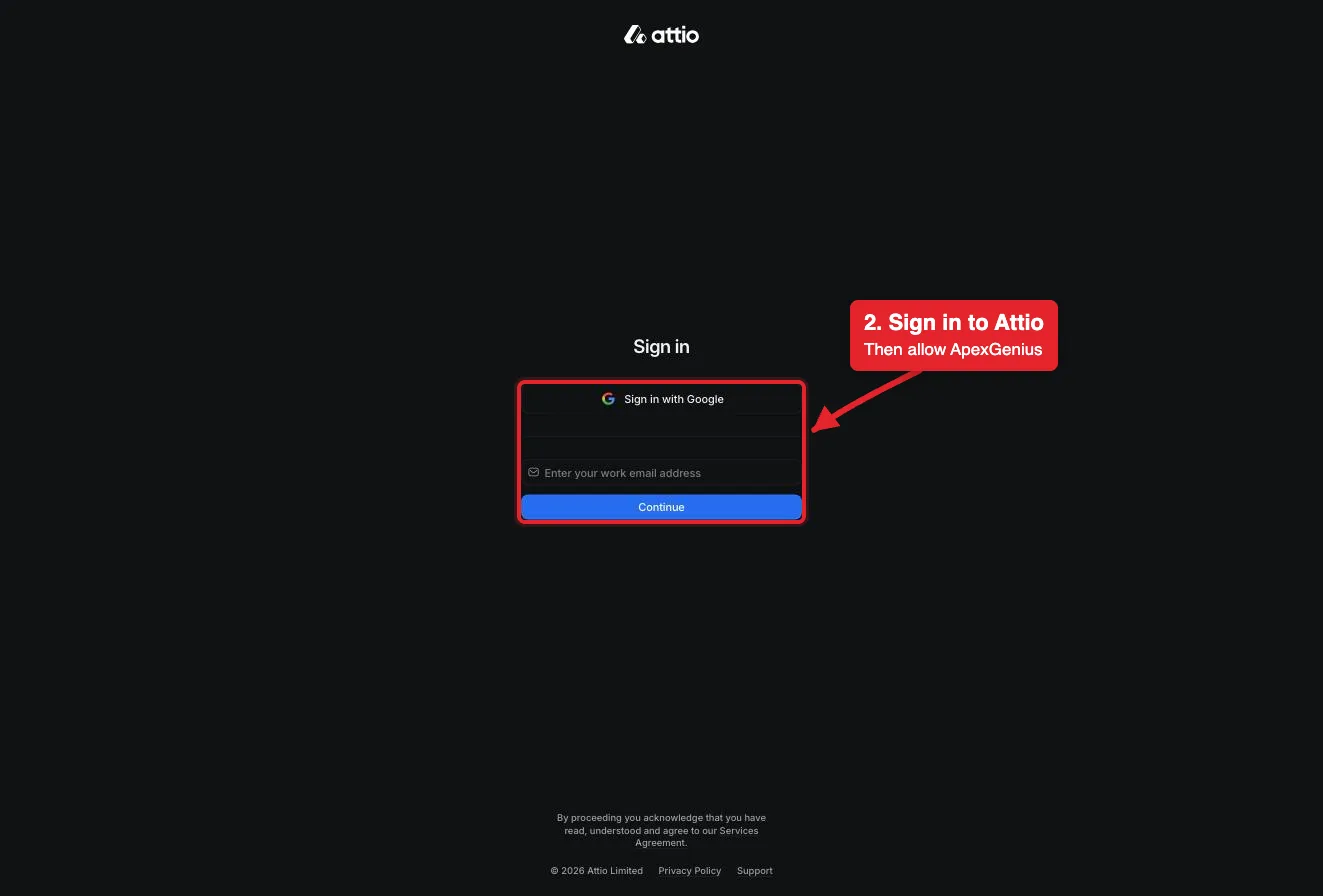
Connect opens Attio's sign-in. Sign in with Google or your work email, then allow ApexGenius.Open full-size image (opens in a new tab) - Review the connected account and resources. Confirm the connected Attio user and workspace. Open Tools to review the record, list, note and task actions. Your Attio permissions set what the connection can reach.
- Check the connection. Use Test connection or Check again and read the reported status. Add an AI agent from the AI agents page, choose Read only for the first test, and try the question below.
2. Connect ApexGenius to Cursor
Use this server address when adding the connection:
https://server.autom8.pro/mcpThe steps are above, under Add the ApexGenius MCP server to Cursor. These notes apply to Cursor only.
- No client ID or secret. Cursor signs in with OAuth and registers itself with ApexGenius, so
mcp.jsonneeds only the address. - Enterprise teams. An MCP allowlist can limit which server addresses run. If apexgenius does not connect on a team account, ask your Cursor admin to allow the ApexGenius address.
- Turning it off. Enable or disable the server from Customize in the sidebar.
- Access. When ApexGenius asks what Cursor may use, choose Read only for the first test, or Custom to limit it to the tools you need.
3. Verify one safe read
Use whoami to show which Attio user and workspace are connected, then list the lists in my workspace. Do not change anything.
Use whoami to show which Attio user and workspace are connected, then list the lists in my workspace. Do not change anything.Compare the returned account and resource with Attio. Check the connection status separately from the result of the first read.
Full guide: the Attio setup guide.
What it looks like in Cursor
Illustration of a task, not a recorded customer result. Your answers come from the account and dates you choose.

apex_search_toolsAttio workspace · Find the Attio read routeCompleteapex_call_read_toolwhoami · Read the connected userCompleteIllustrative example: the connected user is Alex in the Northwind workspace. Compare this with the Attio account you authorized before reading records. Nothing was changed.
Read-only routeWhat to ask Cursor about Attio
- Check the account
Who am I in Attio, and which workspace is connected? Do not change anything.
Runs
whoami(read). - Find contacts
Find every contact at Acme in Attio and show their titles and emails.
Runs
search-records(read), thenget-records-by-ids(read). - Pipeline by stage
Count open deals by stage in Attio. Do not change anything.
Runs
list-attribute-definitions(read), thenrun-basic-report(read).
These 3 questions use 5 of Attio’s 41 operations. The full list is below.
- Log a note on the Acme company record that sums up today's call. Show me the note first. (write)
What Cursor can do in Attio
41 operations: 26 read, 15 write. Read looks things up and changes nothing. Writes change Attio and run only when you turn them on.
Records and objects
5 read · 4 writelist-objectsreadList the objects in the workspace, such as companies, people and deals.
search-recordsreadFull-text search for records by name, email, domain or other indexed fields.
list-recordsreadList records in one object with filters and sorting.
get-records-by-idsreadRead full details for specific records by ID.
list-attribute-definitionsreadList the fields on an object, with their types and valid options.
create-recordwriteCreate a person, company, deal or custom object record.
upsert-recordwriteCreate or update a record that matches on a field such as email or domain.
update-recordwriteUpdate an existing record by its ID.
merge-recordswriteMerge two records of the same object into one. The primary record wins. Cannot be undone here.
Lists and pipelines
3 read · 5 writelist-listsreadList the lists in the workspace, filtered by name or slug.
list-list-attribute-definitionsreadList the entry fields on one list, with their types and options.
list-records-in-listreadList the entries in one list with filters and sorting, including their records.
create-listwriteCreate a list for records of one object type.
add-record-to-listwriteAdd a record to a list as a new entry.
update-listwriteChange a list's name, slug or permissions.
update-list-entry-by-idwriteUpdate a list entry when you know its entry ID.
update-list-entry-by-record-idwriteUpdate the one entry a record has in a list, found by the record ID.
Notes
3 read · 2 writesearch-notes-by-metadatareadFind notes by record, author, meeting or creation time.
semantic-search-notesreadFind notes by topic with AI search.
get-note-bodyreadRead the full text of one note.
create-notewriteCreate a note on a record.
update-notewriteAppend or prepend text to a note, or change its title.
Tasks
1 read · 2 writelist-tasksreadList tasks with filters, such as incomplete tasks due this week.
create-taskwriteCreate a task with a deadline, assignee and linked record.
update-taskwriteChange a task's deadline, status, assignee or linked record.
Comments
2 read · 2 writelist-commentsreadList comments on a record or list entry, with replies.
list-comment-repliesreadLoad more replies in one comment thread.
create-commentwriteComment on a record or list entry, or reply in a thread.
delete-commentwriteDelete a comment you created, with every reply under it.
Meetings and calls
4 readsearch-meetingsreadFind past and upcoming meetings by people, records or time.
search-call-recordings-by-metadatareadFind call recordings by people, records, title or time.
semantic-search-call-recordingsreadFind call recordings by topic with AI search.
get-call-recordingreadRead one call recording with its transcript.
Emails
3 readsearch-emails-by-metadatareadFind emails by people, domain or time.
semantic-search-emailsreadFind emails by topic with AI search.
get-email-contentreadRead the full body of one email.
Workspace
3 readwhoamireadRead the connected user and their workspace access. Start here.
list-workspace-membersreadList workspace members and their teams.
list-workspace-teamsreadList the teams in the workspace.
Reports and SQL
2 readrun-basic-reportreadCount, sum or average records or list entries, grouped as you choose.
query-particle-sqlreadRun a read-only SQL query on workspace data. Not on every Attio plan.
You choose the access. When you approve Cursor, pick Full access, Read only, or Custom.
The connection acts as the Attio user who signed in. Attio permissions set what it can reach; ApexGenius does not add a record-level allowlist.
The read route checks Attio's live tool labels and rejects writes or unlabeled operations.
Writes run immediately. Blocked hides a tool from agents.
Merges and deleted comments cannot be undone here, and there is no delete for records, lists, notes or tasks. Remove those by hand in Attio.
query-particle-sql is not on every Attio plan, and Attio limits calls per workspace. Disconnecting stops future access; it does not undo a change that already ran.
Questions about connecting Cursor to Attio
Updated November 12, 2026.
How do I connect Cursor to Attio?
Sign in to ApexGenius and connect Attio. In Cursor, add an apexgenius entry with the ApexGenius MCP address to mcpServers in ~/.cursor/mcp.json, then choose Connect on the Customize page. Then ask Cursor: “Use whoami to show which Attio user and workspace are connected, then list the lists in my workspace. Do not change anything.” Start with a read, so nothing changes.
How do I check that Cursor can use Attio?
Open Customize in Cursor and find apexgenius among the MCP servers. Its tools should appear under Available Tools. If it is listed but not connected, choose Connect and finish the browser sign-in. On an Enterprise team, the MCP allowlist may need the ApexGenius address. Then ask: “Use whoami to show which Attio user and workspace are connected, then list the lists in my workspace. Do not change anything.”
What can my AI read in Attio?
People, companies, deals and custom records, lists and their entries, notes, tasks, comments, synced meetings, call recordings and emails, plus reports. It sees only what your Attio user can see.
Can my AI change records?
Yes. It can create and update records, list entries, notes and tasks, and merge records. Writes run immediately. Blocked hides a tool from agents.
Can it delete records?
No. Attio's MCP has no delete for records, lists, notes or tasks. The only delete is for a comment you created. Merges cannot be undone here.
Why did a SQL question fail?
query-particle-sql is not on every Attio plan. Ask the same question as a report instead; run-basic-report handles counts, sums and averages.
More connections like this one
Cursor with other apps
 Apollo
 Salesforce
 HubSpot
 Supabase
 Mobbin
 Cal.com
 Slack
 Discord
All 48 apps Cursor can use
 ChatGPT Ads
 GitHub
 Stripe
 Context.dev
 Semrush
 Notion
 Apify
 Linear
 Jira
 HQ Rental
 Google Ads
 Google Analytics
 Google Forms
 Google Meet
 Google Tasks
 Gmail
 Google Calendar
 Google Chat
 Google Docs
 Google Drive
 Google Sheets
 Google Slides
 Blotato
 Bing Webmaster
 Calendly
 ClickUp
 monday.com
 Atlassian Rovo
 Polymarket
 OP.GG
 YouTube
- YouTube Analytics
 n8n
 Confluence
 Google Search Console
 ElevenLabs
 FreshBooks
 Trello
 GitLab
 TypeSafe
 Claude
 Grok Bot
 Muse
Connect Attio to Cursor today
Start free1,000 free credits. No card required. Disconnect any time.