


Connect Hermes Agent to Slack
Connect Hermes Agent to Slack in 3 steps: 1. Sign in to ApexGenius and connect Slack. 2. Add the ApexGenius MCP server. 3. Start using Slack in Hermes Agent.
7 days free · No card required
How to connect Slack to Hermes Agent
- 1Sign in to ApexGenius and connect Slack
- 2Add the ApexGenius MCP server to Hermes Agent
- 3Start using Slack in Hermes Agent
FirstConnect Slack to ApexGenius
ThenConnect ApexGenius to Hermes Agent
Slackslack.com/oauth/v2_user/authorize1 of 3Connect Slack. Slack opens its own sign-in. Sign in and allow ApexGenius.
Then ask Hermes Agent:
Show my connected Slack accounts. For the account I choose, discover the read-only channel-list tool and list up to five channel names. Do not read or send messages.
Written setup, step by stepShow
Before you start
- A Slack account in each workspace and permission to authorize the app. Workspace admins may need to approve it.
1. Connect Slack to ApexGenius
- Open Slack in Connections. Sign in to ApexGenius, open Connections, and choose Slack.
- Choose the Slack user and workspace. Sign in with the intended Slack account. Check the workspace and requested access before you allow it.
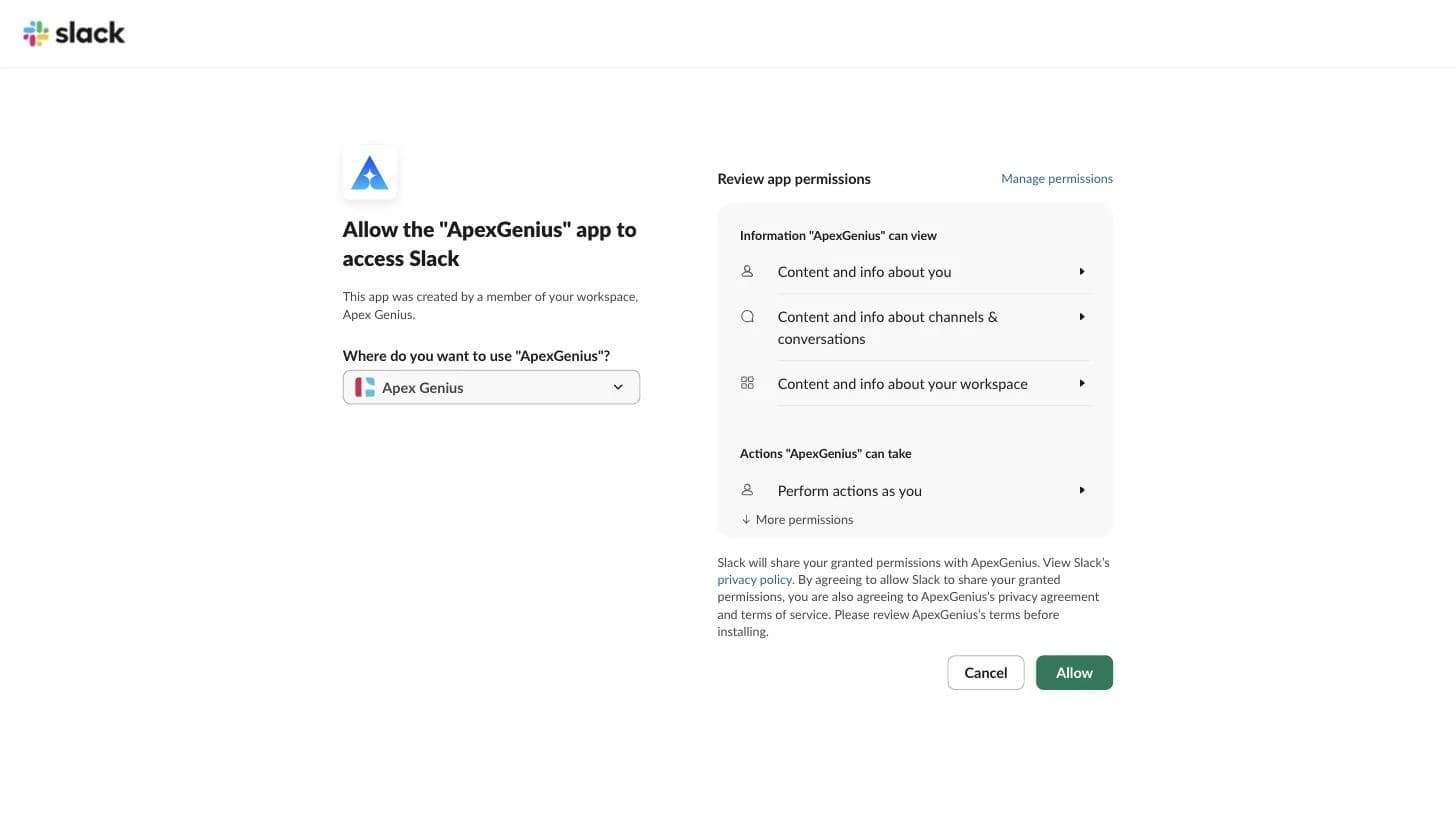
Connect opens Slack's own permission page. Pick the workspace, review what ApexGenius can view and do as you, then choose Allow.Open full-size image (opens in a new tab) - Add your other accounts. Check the saved workspace and user. Choose Add connection and repeat for each account. Use a clear name for each connection. Reconnect signs in to the same user and workspace.
- Choose tools and AI access. Open Tools and Access for each connection. Start with Read only for your AI. Enable writes only when you need them. Enabled writes run when called.
- Try one read per account. Name the intended Slack connection in your request. Check that the result and Tool Activity show that account.
2. Connect ApexGenius to Hermes Agent
Use this server address when adding the connection:
https://server.autom8.pro/mcp- Add ApexGenius as a remote MCP server in your Hermes Agent configuration using the hosted HTTP URL, then complete the authorization in your browser.
- When ApexGenius asks what this AI client may use, choose Read only for the first test, or Custom to limit it to the tools you need.
- Start a new conversation and select ApexGenius from the available tools before asking for live data.
3. Verify one safe read
Show my connected Slack accounts. For the account I choose, discover the read-only channel-list tool and list up to five channel names. Do not read or send messages.
Show my connected Slack accounts. For the account I choose, discover the read-only channel-list tool and list up to five channel names. Do not read or send messages.Compare the selected workspace and user with Slack. Repeat for each connection. A successful read does not verify writes or access to another account.
What Hermes Agent can do in Slack
3 operations. Read looks things up and changes nothing. Write changes Slack and runs only when that tool is enabled.
Read2 operations
Looks things up. Changes nothing.slack_search_toolsDiscover what the selected Slack account can do: Slack's official tools and the Slack Web API methods ApexGenius runs.slack_call_read_toolRun a discovered operation only when it is classified read-only.
Write1 operation
Changes Slack. Runs only when enabled.slack_call_toolRun an enabled Slack write for the selected user and workspace, such as sending, editing, pinning or managing a channel. Writes run when called.
You choose what Hermes Agent can use
When you approve Hermes Agent, pick Full access, Read only, or Custom. Read only allows the Read operations and nothing else. Custom picks apps and tools one by one.
Limits in Slack
- · Each connection identifies both the Slack user and workspace. Two users in one workspace remain separate.
- · Private channels and DMs follow the connected user’s Slack access. ApexGenius does not add access to other users’ private conversations.
- · The read route refuses writes and anything not classified as a read. Enabled writes run when called.
- · ApexGenius uses Slack's official tools and Slack's Web API. Admin methods need a Slack org admin on Enterprise Grid. Sign-in, token and app-management methods are not available.
- · Disconnecting stops future calls. It does not undo a sent message or another completed change.
What it looks like in Hermes Agent
An illustrative read-only request and response. Your results come from the account and dates you choose.

apex_call_read_toolsalesforce_read · Find matching recordsCompleteapex_call_read_toolsalesforce_read · Read related activityComplete
apex_call_read_tooln8n_get_workflow · Check workflow statusCompleteThree safe example reads returned results. Nothing was changed.
Read-only routeTry asking
“Show my connected Slack accounts. For the account I choose, discover the read-only channel-list tool and list up to five channel names. Do not read or send messages.”
“In my chosen Slack account, find the thread I name and summarize its decisions.”
“Draft a reply for this Slack thread. Show the account, recipient and text before sending.”
More connections like this one
One ApexGenius account covers every pair below. Connect an app once and each agent you allow can use it.
Hermes Agent with other apps
- Connect Hermes Agent to Cal.com
- Connect Hermes Agent to Discord
- Connect Hermes Agent to ChatGPT Ads
- Connect Hermes Agent to GitHub
- Connect Hermes Agent to Stripe
- Connect Hermes Agent to Context.dev
- Connect Hermes Agent to Attio
- Connect Hermes Agent to Semrush
- Connect Hermes Agent to Notion
- Connect Hermes Agent to Apify
- Connect Hermes Agent to Linear
- Connect Hermes Agent to Calendly
- Connect Hermes Agent to ClickUp
- Connect Hermes Agent to YouTube
- Connect Hermes Agent to YouTube Analytics
- Connect Hermes Agent to Salesforce
- Connect Hermes Agent to n8n
- Connect Hermes Agent to Confluence
- Connect Hermes Agent to Google Search Console
Questions people ask first
Can I connect several Slack accounts?
Each user and workspace can have its own connection. Add accounts within your connection allowance and name the account in your request.
Can it do everything my Slack account can do?
It reaches most of it. ApexGenius uses Slack's official tools plus Slack's Web API, so pins, bookmarks, reminders, user groups, channel management and message edits are included, within your Slack permissions and the access you approve. Admin methods need a Slack org admin on Enterprise Grid. Sign-in, token and app-management methods are left out.
Can my AI read private messages?
Only messages the connected Slack user can access, when Slack grants the needed permissions and the read tool is enabled.
What does setup require?
An eligible Slack app, workspace approval where required, and separate OAuth consent for each account. Slack permits official MCP access for internal apps and Marketplace-published apps.
Connect Slack to Hermes Agent today
Start free7 days free. No card required. Disconnect any time.