


Connect Hermes Agent to YouTube
Connect Hermes Agent to YouTube: 1. Sign in to ApexGenius and connect YouTube. 2. Add the ApexGenius MCP server. 3. Start using YouTube in Hermes Agent.
1,000 free credits · No card required
How to connect YouTube to Hermes Agent
- 1Sign in to ApexGenius and connect YouTube
- 2Add the ApexGenius MCP server to Hermes Agent
- 3Start using YouTube in Hermes Agent
- 1
Connect YouTube to ApexGenius
Connect YouTube
YouTube opens its own sign-in. Sign in and allow ApexGenius.
- 2
Choose what it can reach
Pick the accounts or properties your AI may use.
- 3
Connect ApexGenius to Hermes Agent
Copy the MCP address
On Start, pick API key, open Manual setup, and copy the MCP address.
- 4
Approve access
ApexGenius opens its approval page. Review the access, then approve.
Then ask Hermes Agent
Show the name and details of my connected YouTube channel.
Written setup, step by stepShow
Before you start
- A Google account with access to the YouTube channel you intend to connect. Check the channel in YouTube first, especially if you use a Brand Account.
- An ApexGenius account with this module available. If setup is pending or the module is missing, contact support.
1. Connect YouTube to ApexGenius
- Open YouTube in Connections. Find the YouTube group and open YouTube. Each module has its own channel and access selection.
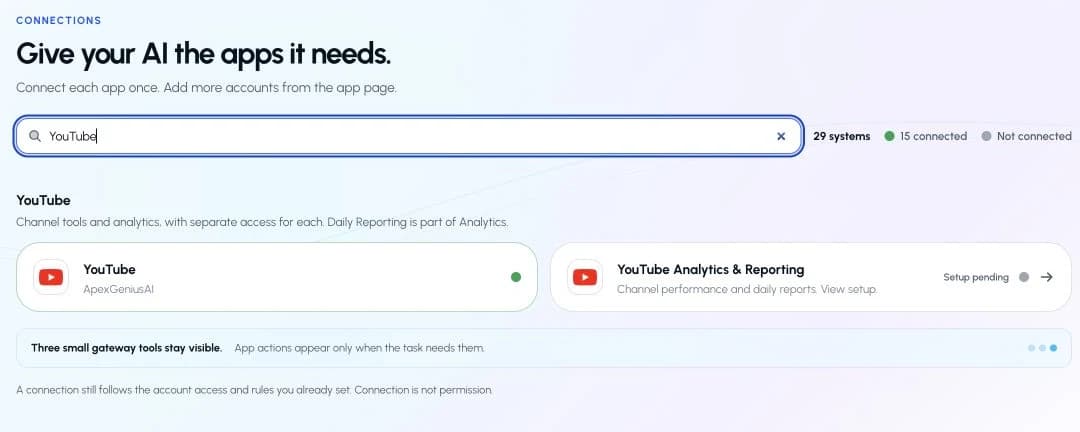
Find the YouTube group and open YouTube. Analytics & Reporting has its own setup.Open full-size image (opens in a new tab) 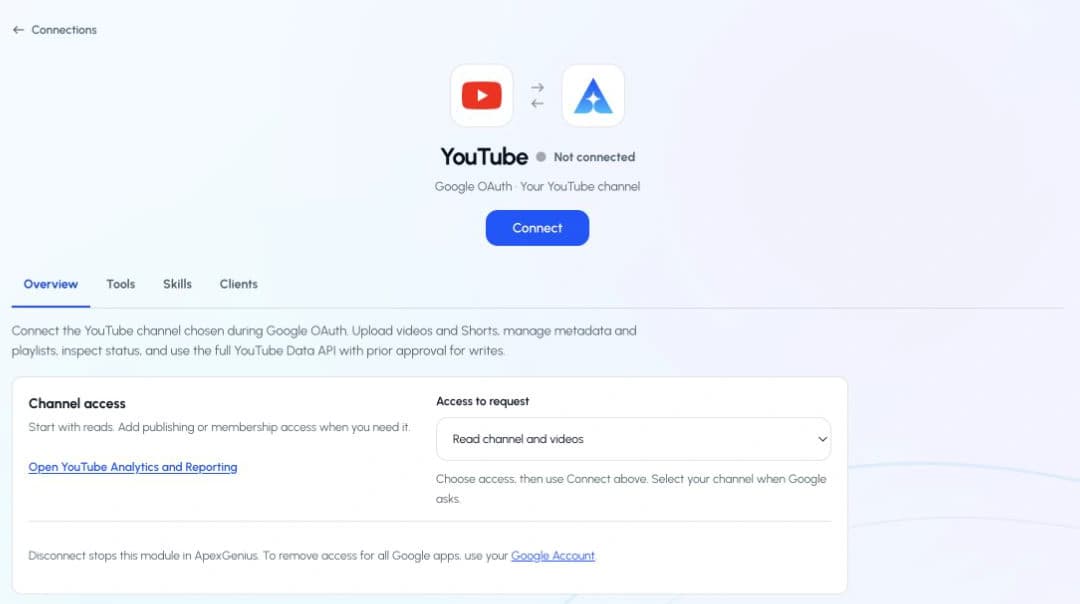
Earlier setup view. Review the current read-only access, then use Connect for initial setup.Open full-size image (opens in a new tab) - Review read-only access. Read channel details, videos, and playlists. Uploads, edits, captions, comments, subscriptions, and livestream tools are not included. Use Connect only when setting up this module.
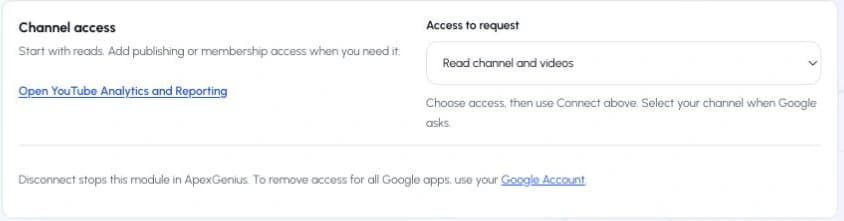
Earlier setup view, captured September 7. The current panel shows read-only access without an access selector.Open full-size image (opens in a new tab) - Select your Google account and YouTube channel. On Google’s own page, select the account with access to your intended channel. If Google offers a channel or Brand Account choice, select the intended channel. Review the requested permissions before continuing. Already granted permissions may make these screens look different. Return to ApexGenius when Google finishes.
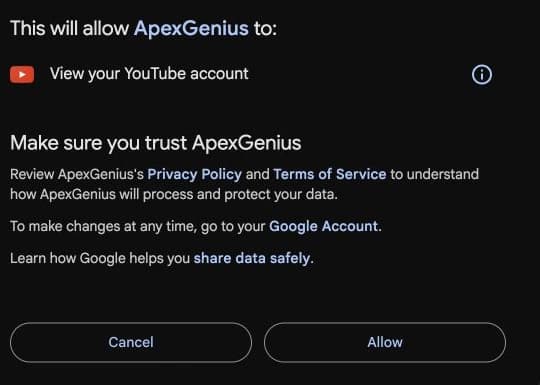
Review the requested YouTube permission, then choose Allow.Open full-size image (opens in a new tab) - Enable the connected channel. Confirm the saved channel name. Open Tools, find Allowed resources, and choose Refresh if needed. Enable the intended channel. Enabling it allows ApexGenius to use existing access; it does not grant new YouTube permissions. If the channel is wrong, stop and connect the intended channel.

Check the channel name and turn on its access.Open full-size image (opens in a new tab) - Check the connection status. Use Test connection or Check again when offered. Read the returned status and confirm the saved channel. A healthy connection does not yet prove that a tool read will work.
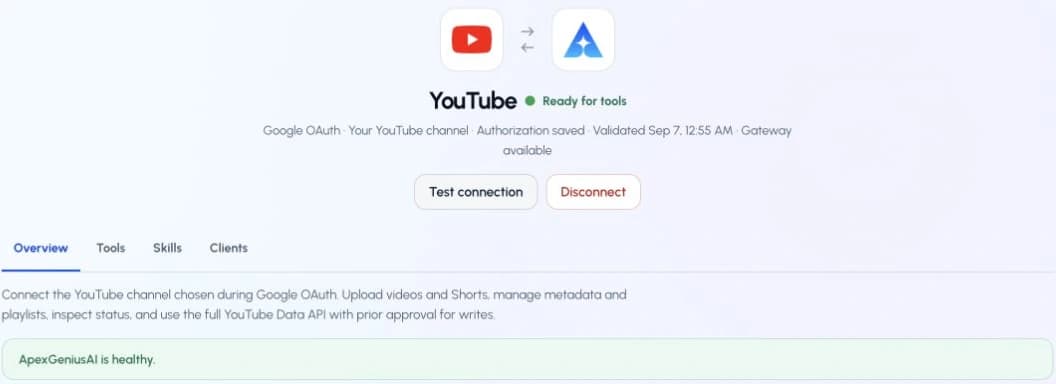
Select Test connection and check the returned channel and status.Open full-size image (opens in a new tab) - Run your first read with an AI agent. Open AI agents and add or select your AI client. Allow this connection with Read only for the first test. Use the question below, then compare the returned channel and data with YouTube Studio. Empty recent analytics can mean data is not available yet.AI agents · First readGuide frame
- Connection
- YouTube
- Access for first test
- Read only
Copy the first question below into your connected AI client. Check the returned channel and result.
Illustrated setup guidance. Follow the controls shown in your own account. Drawn by ApexGenius, not a screenshot, so your screen may differ by version.
2. Connect ApexGenius to Hermes Agent
Use this server address when adding the connection:
https://server.autom8.pro/mcp- Add ApexGenius as a remote MCP server in your Hermes Agent configuration using the hosted HTTP URL, then complete the authorization in your browser.
- When ApexGenius asks what this AI client may use, choose Read only for the first test, or Custom to limit it to the tools you need.
- Start a new conversation and select ApexGenius from the available tools before asking for live data.
3. Verify one safe read
Show the name and details of my connected YouTube channel.
Show the name and details of my connected YouTube channel.Check connection status, the first tool result, and the channel identity separately. If access is missing, review the connection status and enabled channel. Do not assume a new grant is needed. Disconnect stops this module in ApexGenius; Google Account access removal can affect other Google apps.
Full guide: the YouTube setup guide.
What it looks like in Hermes Agent
Illustration of a task, not a recorded customer result. Your answers come from the account and dates you choose.
apex_search_toolsYouTube channel identity · Find YouTube channel readsCompleteapex_call_read_toolyoutube_channels_list · Read the connected channelCompleteIllustrative example: here is your connected channel, with its name, description and channel ID. Use this to confirm which channel your AI can work with.
Read-only routeTry asking
Show the name and details of my connected YouTube channel.
Show the playlists for my connected YouTube channel.
Read the title, description and status of a video I choose from my channel. Suggest changes without saving them.
Find videos on my channel about a topic I choose. Show their titles and descriptions.
What Hermes Agent can do in YouTube
13 operations: 13 read. Every operation looks things up and changes nothing, so Hermes Agent cannot change YouTube through ApexGenius.
Channel tools
13 readyoutube_activities_listreadRead recent activity for your enabled channel. Read only. Uses your enabled channel and current Google access.
youtube_channel_sections_listreadList the sections shown on your enabled channel. Read only. Uses your enabled channel and current Google access.
youtube_channels_listreadRead the name, description, and details of your enabled channel. Read only. Uses your enabled channel and current Google access.
youtube_i18n_languages_listreadList the languages supported by YouTube. Read only. Uses your enabled channel and current Google access.
youtube_i18n_regions_listreadList the regions supported by YouTube. Read only. Uses your enabled channel and current Google access.
youtube_playlist_items_listreadList videos in a playlist owned by your enabled channel. Read only. Uses your enabled channel and current Google access.
youtube_playlists_listreadList playlists owned by your enabled channel. Read only. Uses your enabled channel and current Google access.
youtube_search_listreadFind videos and playlists on your enabled channel. Read only. Uses your enabled channel and current Google access.
youtube_video_abuse_report_reasons_listreadRead YouTube video report categories. This does not submit a report. Read only. Uses your enabled channel and current Google access.
youtube_video_categories_listreadRead the video categories YouTube supports. Read only. Uses your enabled channel and current Google access.
youtube_videos_batch_get_statsreadRead available statistics for videos owned by your enabled channel. Read only. Uses your enabled channel and current Google access.
youtube_videos_get_ratingreadRead your account rating for videos owned by your enabled channel. Read only. Uses your enabled channel and current Google access.
youtube_videos_listreadRead titles, descriptions, and details of videos owned by your enabled channel. Read only. Uses your enabled channel and current Google access.
You choose the access. When you approve Hermes Agent, pick Full access, Read only, or Custom.
Use the Google account that can access the intended YouTube channel. Check the saved channel before enabling it.
These modules expose read-only tools. Listing a tool does not prove that it has run successfully for your account.
YouTube tools read information about videos. They do not watch the video, hear its audio, or read captions.
Uploads, edits, comments, subscriptions, livestream tools, and captions are not offered by this connection.
Questions about connecting Hermes Agent to YouTube
Updated September 14, 2026.
How do I connect Hermes Agent to YouTube?
Connect Hermes Agent to YouTube through ApexGenius in three steps. Sign in to ApexGenius and connect YouTube by signing in with the Google account for your channel, then enabling the channel. Add ApexGenius to Hermes Agent. Then open a task in Hermes Agent and ask a question about your YouTube. Start with a read, so nothing changes.
Is there a YouTube MCP server for Hermes Agent?
Yes. ApexGenius is an MCP server that Hermes Agent connects to once. It carries your YouTube connection and 13 YouTube operations, so Hermes Agent does not need a separate YouTube integration or plugin. You set it up one time and add each agent the same way.
What can Hermes Agent do in YouTube once it is connected?
Hermes Agent can run 13 YouTube operations through ApexGenius: 13 reads on your enabled channel, covering channel details, videos, playlists, ratings, activities, search and YouTube reference lists. It does not watch video or read captions. Every operation looks things up and changes nothing.
Can Hermes Agent read my YouTube channel?
The channel you pick on Google’s screen and enable in ApexGenius. Check the saved name before you enable it, especially with a Brand Account. Hermes Agent reads information about videos. It does not watch them, hear audio or read captions. Uploads and comments are not offered.
Can Hermes Agent change my YouTube?
No. Hermes Agent cannot change YouTube through ApexGenius. The connection exposes read-only tools, so it cannot upload, publish, edit or delete videos. Comments, subscriptions, livestream tools and captions are not offered either. Anything you want to change, you change in YouTube itself.
Can I use the same YouTube connection with Claude, ChatGPT, Grok Bot or Muse?
Yes. One YouTube connection in ApexGenius works with every compatible agent you add, including Claude, ChatGPT, Grok Bot or Muse. Each agent gets its own access choice and its own short setup, so you can pick read only for one agent and more for another.
More connections like this one
Hermes Agent with other apps
 ChatGPT Ads
 Semrush
 Google Ads
 Google Analytics
 Blotato
 Bing Webmaster
- YouTube Analytics
 Google Search Console
All 44 apps Hermes Agent can use
 Supabase
 Mobbin
 Cal.com
 Slack
Slack Discord
 GitHub
 Stripe
 Context.dev
 Attio
Attio Notion
 Apify
Apify Linear
 Jira
Jira HQ Rental
 Google Forms
 Google Meet
 Google Tasks
 Gmail
Gmail Google Calendar
 Google Chat
 Google Docs
 Google Drive
 Google Sheets
 Google Slides
 Apollo
 Calendly
 ClickUp
 monday.com
 Atlassian Rovo
 Polymarket
 OP.GG
OP.GG Salesforce
 n8n
n8n Confluence
 ElevenLabs
 FreshBooks
 Claude
 Grok Bot
 Muse
MuseConnect YouTube to Hermes Agent today
Start free1,000 free credits. No card required. Disconnect any time.