


Connect ChatGPT to FreshBooks
Connect ChatGPT to FreshBooks in 3 steps: 1. Sign in to ApexGenius and connect FreshBooks. 2. Add the ApexGenius plugin. 3. Start using FreshBooks in ChatGPT.
1,000 free credits · No card required
How to connect FreshBooks to ChatGPT
- 1Sign in to ApexGenius and connect FreshBooks
- 2Add the ApexGenius plugin to ChatGPT
- 3Start using FreshBooks in ChatGPT
- 1
Connect FreshBooks to ApexGenius
FreshBooks connected
FreshBooks shows as connected in ApexGenius, with what your AI can reach.
- 2
Connect ApexGenius to ChatGPT
Choose ChatGPT
Back on Start, pick ChatGPT and copy the prompt.
- 3
Add it in ChatGPT
In ChatGPT, open Settings, then Plugins, then Create. Paste the address, keep OAuth.
- 4
Approve access
ApexGenius opens its approval page. Review the access, then approve.
Add the ApexGenius plugin to ChatGPT
ChatGPT adds a custom MCP server as a plugin, under Plugins. There is no config file.
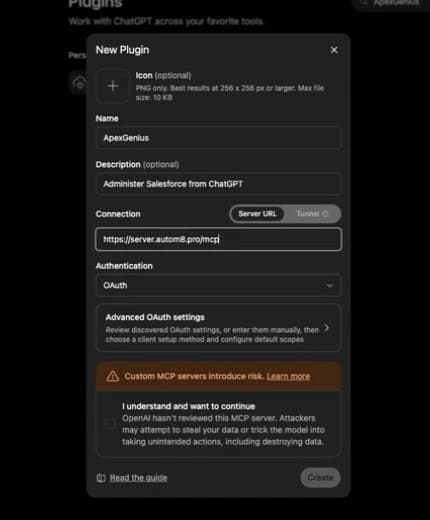
- Go to ChatGPT Plugins, select the plus button, then Add custom MCP server.
- Enter the name ApexGenius and a description. Under Connection, enter the MCP address, including the
/mcppath. - Configure authentication, review the risk warning and select I understand and want to continue. Select Create as a plugin.
- Complete the ApexGenius sign-in, approve access, and review the tools ChatGPT found.
The MCP address
https://server.autom8.pro/mcp
Check it. Start a new conversation, type @ in the prompt box and select the ApexGenius plugin.
Steps follow OpenAI Developers, Connect and test your plugin (opens in a new tab), read November 12, 2026.
Then ask ChatGPT
Which FreshBooks business is connected? List its five most recent invoices with client, amount and status. Do not change anything.
Written setup, step by stepShow
Before you start
- An account with permission to use the FreshBooks resources you intend to connect.
- ChatGPT developer mode must be available to your account and allowed by your workspace.
1. Connect FreshBooks to ApexGenius
- Open FreshBooks in Connections. Choose Connect, or Add connection when offered. Give the connection a name if prompted. If Gateway setup pending appears, contact ApexGenius support before continuing.
- Choose the account and review access. Sign in to FreshBooks in the browser and allow access for ApexGenius. FreshBooks uses browser authorization; no API key is pasted into ApexGenius. ApexGenius asks for read scopes plus project and time-entry access.
- Review the connected account and resources. Find Allowed resources on the connection page. Each FreshBooks business your login keeps books for is listed. Turn on exactly one; every call goes to that business. A login with one business has it turned on already.
- Check the connection. Use Test connection or Check again and read the reported status. Add an AI agent from the AI agents page, choose Read only for the first test, and try the question below.
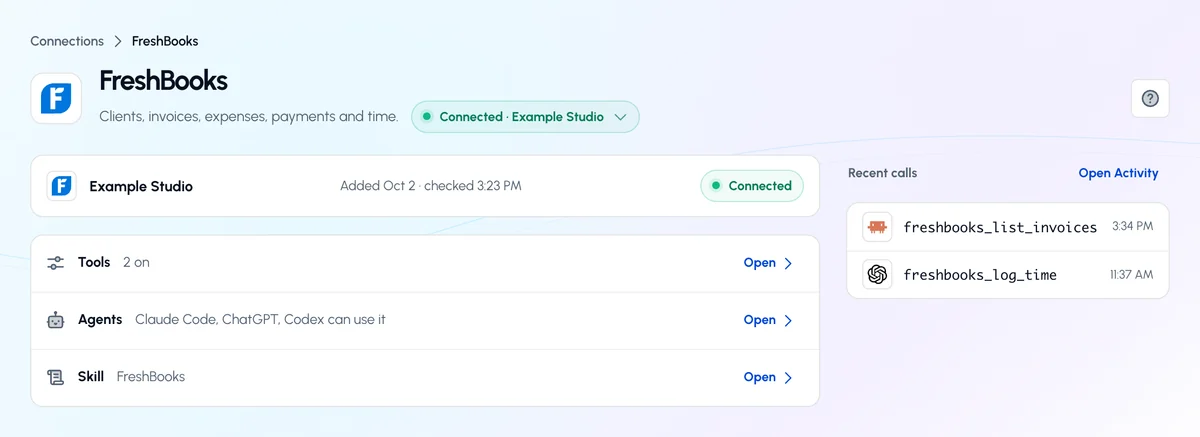
The FreshBooks page after you connect. The status control reads Connected; open it and choose Check again to confirm FreshBooks answers.Open full-size image (opens in a new tab)
2. Connect ApexGenius to ChatGPT
Use this server address when adding the connection:
https://server.autom8.pro/mcpThe steps are above, under Add the ApexGenius plugin to ChatGPT. These notes apply to ChatGPT only.
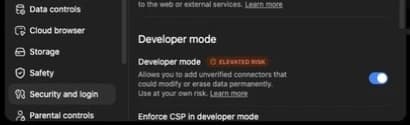
- If Add custom MCP server is missing. Account and workspace policies apply to custom MCP servers. Where ChatGPT offers Developer mode, turn it on under Settings, then Security and login. It has to be available to your account and allowed by your workspace.
- After ApexGenius adds tools. Open the connection at ChatGPT Plugins and select Refresh, then start a new conversation.
- Access. When ApexGenius asks what ChatGPT may use, choose Read only for the first test, or Custom to limit it to the tools you need.
Read the steps Follow along at your own pace
1. Enable developer mode
2. Create the plugin
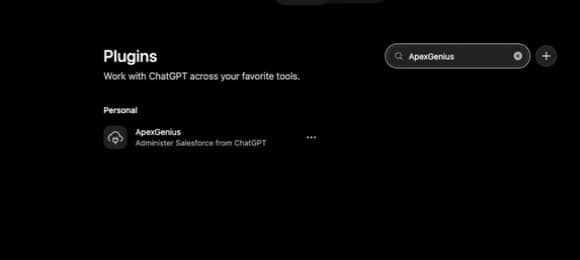
3. Find ApexGenius
4. Review the connection
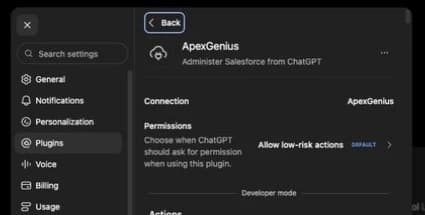
3. Try your first question
Which FreshBooks business is connected? List its five most recent invoices with client, amount and status. Do not change anything.
Which FreshBooks business is connected? List its five most recent invoices with client, amount and status. Do not change anything.Check that the answer matches what you see in FreshBooks.
Full guide: the FreshBooks setup guide.
What it looks like in ChatGPT Work

apex_search_toolsFreshBooks invoices · Find the FreshBooks read routeCompleteapex_call_read_toollist_invoices · List outstanding invoicesCompleteapex_call_read_toolget_client · Read the clients who oweCompleteSix invoices are unpaid across four clients, and two are past due. The amounts are listed with their currency code.
Read-only routeWhat to ask ChatGPT about FreshBooks
- Unpaid invoices
Which FreshBooks invoices are still unpaid, who owes them, and how much is due in total? Do not change anything.
Runs
list_invoices(read), thenget_client(read). - Profit and loss
Run my FreshBooks profit and loss report for last quarter, month by month. Do not change anything.
Runs
get_identity(read), thenget_profit_and_loss_report(read). - Hours this week
How many hours did I log in FreshBooks this week, by project? Do not change anything.
Runs
list_time_entries(read), thenlist_projects(read).
These 3 questions use 6 of FreshBooks’s 21 operations. The full list is below.
- List last month's FreshBooks expenses and total them by category. Do not change anything. (read)
- Log 2 hours to my website redesign project for today with the note "homepage review". Show me the entry first. (write)
What ChatGPT can do in FreshBooks
21 operations: 17 read, 4 write. Read looks things up and changes nothing. Writes change FreshBooks and run only when you turn them on.
Login and businesses
1 readget_identityreadRead the signed-in FreshBooks login and the businesses it belongs to.
Clients and invoices
4 readlist_clientsreadList clients. Filter by email, organization, or an outstanding or overdue balance.
get_clientreadRead one client.
list_invoicesreadList invoices. Filter by status, client, date, amount or what is still outstanding.
get_invoicereadRead one invoice, with its line items if asked.
Expenses and payments
4 readlist_expensesreadList expenses. Filter by date, vendor, category, client or project.
get_expensereadRead one expense.
list_paymentsreadList payments. Filter by invoice, client, date or amount.
get_paymentreadRead one payment.
Reports
4 readget_profit_and_loss_reportreadRead the profit and loss report, by month or quarter if asked.
get_invoice_details_reportreadRead the invoice details report.
get_payments_collected_reportreadRead the payments collected report.
get_tax_summary_reportreadRead the tax summary report.
Projects
2 read · 2 writelist_projectsreadList projects, with the time logged so far if asked.
get_projectreadRead one project.
create_projectwriteCreate a project for a client, billed hourly or at a fixed price.
update_projectwriteChange a project, such as its rate, or mark it complete.
Time tracking
2 read · 2 writelist_time_entriesreadList time entries. Filter by client, date, billable or billed.
get_time_entryreadRead one time entry.
create_time_entrywriteLog time to a client and project, with a note.
update_time_entrywriteFix a time entry, such as its hours, date or note.
You choose the access. When you approve ChatGPT, pick Full access, Read only, or Custom.
One connection is one FreshBooks login. Every call goes to the one business that is turned on, and a call cannot name another.
Accounting is read only. The connector cannot create, send or change an invoice, record a payment, or delete anything.
The read route runs only reads. Creating and updating projects and time entries uses the write route.
Writes run immediately. Blocked hides a tool from agents.
A project or time entry made by mistake can be fixed with update_project or update_time_entry, or deleted by you in FreshBooks.
Questions about connecting ChatGPT to FreshBooks
Updated November 12, 2026.
How do I connect ChatGPT to FreshBooks?
Sign in to ApexGenius and connect FreshBooks. In ChatGPT, go to Plugins, select the plus button, then Add custom MCP server, and enter the ApexGenius MCP address under Connection. Then ask ChatGPT: “Which FreshBooks business is connected? List its five most recent invoices with client, amount and status. Do not change anything.” Start with a read, so nothing changes.
How do I check that ChatGPT can use FreshBooks?
Start a new conversation, type @ in the prompt box and select the ApexGenius plugin. If the plugin does not list a tool you expect, open the connection at ChatGPT Plugins and select Refresh. Then ask: “Which FreshBooks business is connected? List its five most recent invoices with client, amount and status. Do not change anything.”
What can my AI read in FreshBooks?
Your login and its businesses, clients, invoices, expenses, payments, projects and time entries, and the profit and loss, tax summary, invoice details and payments collected reports. It reads only the one business you turned on.
Can my AI change anything in FreshBooks?
Only projects and time. It can create and update projects, and log and fix time entries. It cannot create, send or change an invoice, record a payment, or delete anything. Writes run immediately. Blocked hides a tool from agents.
Can I start with read-only access?
Yes. Choose Read only when you add your AI agent. It keeps every read and never sees the project and time-entry writes.
What if my login has more than one business?
Each business shows up as an account on the FreshBooks connection page. Turn on exactly one. Calls are refused until one is on, and they never reach a business that is off.
More connections like this one
ChatGPT with other apps
 Supabase
 Cal.com
 GitHub
 Stripe
 Linear
 Jira
 HQ Rental
 Google Forms
All 50 apps ChatGPT can use
 Google Tasks
 Google Calendar
 Google Sheets
 Calendly
 ClickUp
 monday.com
 ElevenLabs
 Trello
 GitLab
 Outlook Calendar
 Mobbin
 Slack
 Discord
- ChatGPT Ads
 Context.dev
 Attio
 Semrush
 Notion
 Apify
 Google Ads
 Google Analytics
 Google Meet
 Gmail
 Google Chat
 Google Docs
 Google Drive
 Google Slides
 Apollo
 Blotato
 Bing Webmaster
 Atlassian Rovo
 Polymarket
 OP.GG
 YouTube
- YouTube Analytics
 Salesforce
 n8n
 Confluence
 Google Search Console
 TypeSafe
 HubSpot
- Microsoft Outlook
Other agents with FreshBooks
 Claude
 Grok Bot
 Muse
Connect FreshBooks to ChatGPT today
Start free1,000 free credits. No card required. Disconnect any time.