


Connect ChatGPT to Apollo
Connect ChatGPT to Apollo in 3 steps: 1. Sign in to ApexGenius and connect Apollo. 2. Add the ApexGenius plugin. 3. Start using Apollo in ChatGPT.
1,000 free credits · No card required
How to connect Apollo to ChatGPT
- 1Sign in to ApexGenius and connect Apollo
- 2Add the ApexGenius plugin to ChatGPT
- 3Start using Apollo in ChatGPT
FirstConnect Apollo to ApexGenius
ThenConnect ApexGenius to ChatGPT
Apolloapexgenius.ai/connections/apollo1 of 4Connect Apollo. Apollo shows as connected in ApexGenius.
Then ask ChatGPT:
Find the available Apollo account and workspace read tools. Do not enrich contacts, send messages, or spend credits.
Written setup, step by stepShow
Before you start
- An account with permission to use the Apollo resources you intend to connect.
- ChatGPT developer mode must be available to your account and allowed by your workspace.
1. Connect Apollo to ApexGenius
- Open Apollo in Connections. Choose Connect, or Add connection when offered. Give the connection a name if prompted. If Gateway setup pending appears, contact ApexGenius support before continuing.
- Choose the account and review access. Sign in to Apollo and review the requested workspace access. Apollo uses browser authorization; no Apollo API key is pasted into ApexGenius.
- Review the connected account and resources. Confirm the connected Apollo workspace. Open Tools to review its available actions. Enrichment and other paid actions use Apollo credits.
- Check the connection. Use Test connection or Check again and read the reported status. Add an AI agent from the AI agents page, choose Read only for the first test, and try the question below.
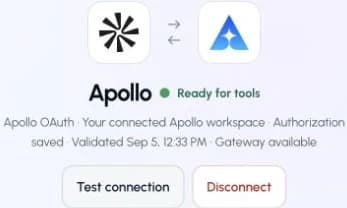
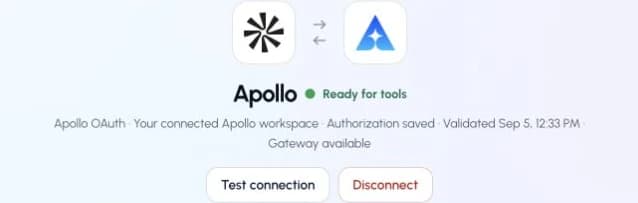
This captured Apollo connection reports ready. Check your own connection and its latest validation before using tools.Open full-size image (opens in a new tab)
2. Connect ApexGenius to ChatGPT
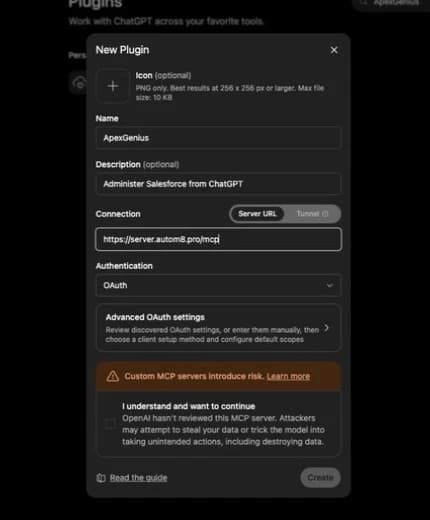
Use this server address when adding the connection:
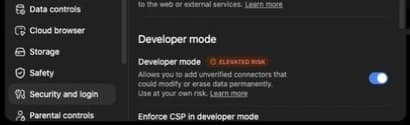
https://server.autom8.pro/mcp- In ChatGPT, open Settings, then Security and login. Turn on Developer mode if your account and workspace allow it.
- Open ChatGPT Plugins and select the plus button. Name the connection ApexGenius, add a description, and enter the MCP URL above under Connection.
- Create the connection, complete the ApexGenius OAuth sign-in and authorization, and review the discovered tools.
- When ApexGenius asks what this AI client may use, choose Read only for the first test, or Custom to limit it to the tools you need.
- Start a new conversation and select ApexGenius from the available tools before asking for live data.
Read the steps Follow along at your own pace
1. Enable developer mode
2. Create the plugin
3. Find ApexGenius
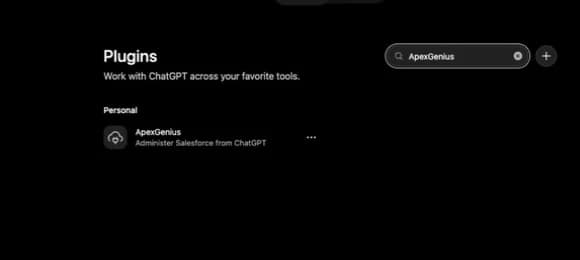
4. Review the connection
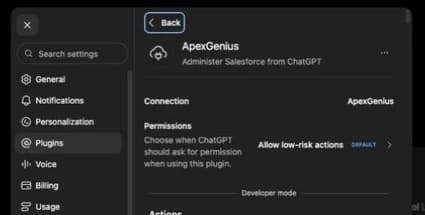
3. Verify one safe read
Find the available Apollo account and workspace read tools. Do not enrich contacts, send messages, or spend credits.
Find the available Apollo account and workspace read tools. Do not enrich contacts, send messages, or spend credits.Compare the returned account and resource with Apollo. Check the connection status separately from the result of the first read.
What ChatGPT can do in Apollo
87 operations. Read looks things up and changes nothing. Write changes Apollo and runs only when that tool is enabled.
Read39 operations
Looks things up. Changes nothing.Find people and companies
apollo_mixed_people_api_searchSearch Apollo’s database for people by title, company, location and more.apollo_organizations_lookupLook up a company by its domain.apollo_webhook_result_showCheck the result of an enrichment that finishes later.
Contacts and accounts
apollo_contacts_searchSearch your saved contacts.
Deals
apollo_deals_searchSearch your deals.apollo_deals_showRead one deal with its stage and amount.
Lists and fields
apollo_labels_indexList your lists.apollo_fields_indexList your fields.
Sequences
apollo_emailer_campaigns_searchSearch your sequences.apollo_emailer_campaigns_showRead a sequence’s steps and emails.apollo_emailer_campaigns_step_contentRead the custom step content written for a contact.apollo_emailer_campaigns_activity_feedRead one contact’s sequence history.apollo_emailer_schedules_indexList your sending schedules.
Emails
apollo_emailer_messages_email_send_statusCheck whether an email was delivered.apollo_emailer_messages_searchReport on the emails of a sequence.apollo_emailer_messages_get_contentRead sent emails.apollo_email_accounts_indexList the mailboxes your team sends from.
Tasks and calls
apollo_tasks_searchSearch tasks.apollo_tasks_showRead one task, including the message it will send.apollo_phone_calls_searchSearch logged calls.
Conversations
apollo_conversations_searchSearch recorded conversations.apollo_conversations_get_transcriptRead a conversation’s transcript.apollo_conversations_get_insightsRead Apollo’s insights on a conversation.apollo_conversations_get_recording_linksGet short-lived links to a recording.
Reports and team
apollo_analytics_sync_reportReport on emails, calls, meetings, tasks and deals, grouped how you want.apollo_usage_stats_credit_usage_statsSee how many Apollo credits were used.apollo_users_searchFind teammates and their user IDs.apollo_users_api_profileRead your own Apollo profile.
Website visitors
apollo_website_visitors_domain_aggregatesSee which companies visited your site.apollo_website_visitor_domain_tracker_install_scriptGet the tracking script for your site.
Collections and imports
apollo_custom_objects_showRead a record collection.apollo_custom_object_records_searchSearch the rows in a collection.apollo_dynamic_field_enrichment_ongoing_enrichment_requestsCheck enrichment progress.apollo_csv_exports_showCheck a CSV export.
Context Center
apollo_context_center_showRead your profile and products.apollo_context_center_show_productRead one product.
Domains and mailboxes
apollo_domain_purchase_indexList the domains you bought through Apollo.apollo_email_account_purchase_indexList the mailboxes you bought through Apollo.
Help and feedback
apollo_prompts_suggestSuggest things to try in Apollo.
Write48 operations
Changes Apollo. Runs only when enabled.Find people and companies
apollo_mixed_companies_searchSearch Apollo’s database for companies.apollo_organizations_enrichFill in one company’s details. Uses credits.apollo_organizations_bulk_enrichFill in details for many companies at once. Uses credits.apollo_organizations_job_postingsRead a company’s open job postings.apollo_people_matchFill in one person’s details, such as email and phone. Uses credits.apollo_people_bulk_matchFill in details for many people at once. Uses credits.
Contacts and accounts
apollo_contacts_createSave a new contact.apollo_contacts_bulk_createSave many contacts at once.apollo_contacts_updateChange a saved contact.apollo_accounts_createSave a new account.apollo_accounts_bulk_createSave many accounts at once.apollo_accounts_updateChange a saved account.
Deals
apollo_deals_createCreate a deal.
Lists and fields
apollo_labels_createCreate a list.apollo_labels_updateRename or change a list.apollo_labels_add_entity_ids_to_label_namesAdd records to lists.apollo_labels_remove_entity_ids_from_label_namesRemove records from lists.apollo_fields_createCreate a custom field.apollo_fields_updateChange a custom field.
Sequences
apollo_sequences_createCreate a sequence.apollo_sequences_updateChange a sequence.apollo_emailer_campaigns_add_contact_idsAdd contacts to a sequence.apollo_emailer_campaigns_remove_or_stop_contact_idsRemove or stop contacts in sequences.apollo_emailer_campaigns_approveTurn a sequence on. Apollo starts sending real emails.
Emails
apollo_emailer_messages_createWrite an email draft. It is not sent.apollo_emailer_messages_send_nowSend a drafted email right away.
Tasks and calls
apollo_tasks_createCreate a task.apollo_tasks_bulk_createCreate many tasks at once.apollo_tasks_updateChange a task.apollo_tasks_completeMark a task done. In a sequence, the contact moves to the next step.apollo_tasks_skipSkip a task.apollo_phone_calls_createLog a call.apollo_phone_calls_updateChange a logged call.
Website visitors
apollo_website_visitor_domain_tracker_indexRead your tracked domains.apollo_website_visitor_domain_tracker_send_install_emailEmail the tracking script to someone to install.apollo_website_visitor_domain_tracker_updateAdd or change a tracked domain.
Collections and imports
apollo_custom_objects_createCreate a record collection.apollo_data_sources_createAttach a data source to a collection.apollo_data_source_imports_createRun an import into a collection.apollo_dynamic_field_enrichment_enrichEnrich rows in a collection. Uses credits.apollo_csv_exports_export_viewExport a collection to CSV.
Context Center
apollo_context_center_create_profileCreate your ideal customer profile.apollo_context_center_update_profileChange your ideal customer profile.apollo_context_center_create_productAdd a product.apollo_context_center_update_productChange a product.
Domains and mailboxes
apollo_email_account_purchase_createBuy mailboxes through Apollo. This spends money.
Help and feedback
apollo_feedback_logReport a bad result to Apollo.apollo_survey_submitSend Apollo a survey you chose to take.
You choose what ChatGPT can use
When you approve ChatGPT, pick Full access, Read only, or Custom. Read only allows the Read operations and nothing else. Custom picks apps and tools one by one.
Limits in Apollo
- · Your Apollo plan, credits and permissions decide what can be used.
- · Enrichment uses Apollo credits. Sending email and turning on a sequence reach real people. Buying mailboxes spends money.
- · Enabled writes run immediately. Turn a tool off to block calls.
- · Disconnecting stops future access. It does not unsend email or refund credits.
What it looks like in ChatGPT Work
An illustrative read-only request and response. Your results come from the account and dates you choose.

apex_search_toolsApollo profile credits · Find Apollo toolsCompleteapex_call_write_toolapollo_users_api_profile · Read your profileCompleteapex_call_write_toolapollo_usage_stats_credit_usage_stats · Read credit usageCompleteIllustrative example: you are an admin on the Northwind workspace, and the team used 1,240 of 4,000 credits this month. Nothing was changed.
Read-only routeTry asking
“Show my Apollo profile and how many credits we used this month. Do not enrich or send anything.”
“Find VPs of Sales at software companies in Texas with 50 to 200 people.”
“Which tasks are due today, and which contacts do they belong to?”
“Add the five contacts I name to the onboarding sequence. Show me the list first.”
More connections like this one
One ApexGenius account covers every pair below. Connect an app once and each agent you allow can use it.
ChatGPT with other apps
 MobbinConnect ChatGPT to Mobbin
 Cal.comConnect ChatGPT to Cal.com
 SlackConnect ChatGPT to Slack
 DiscordConnect ChatGPT to Discord
- ChatGPT AdsConnect ChatGPT to ChatGPT Ads
 GitHubConnect ChatGPT to GitHub
 StripeConnect ChatGPT to Stripe
 Context.devConnect ChatGPT to Context.dev
 AttioConnect ChatGPT to Attio
 SemrushConnect ChatGPT to Semrush
 NotionConnect ChatGPT to Notion
 ApifyConnect ChatGPT to Apify
 LinearConnect ChatGPT to Linear
 JiraConnect ChatGPT to Jira
 HQ RentalConnect ChatGPT to HQ Rental
 Google AdsConnect ChatGPT to Google Ads
 Google AnalyticsConnect ChatGPT to Google Analytics
 Google FormsConnect ChatGPT to Google Forms
 Google MeetConnect ChatGPT to Google Meet
 Google TasksConnect ChatGPT to Google Tasks
 GmailConnect ChatGPT to Gmail
 Google CalendarConnect ChatGPT to Google Calendar
 Google ChatConnect ChatGPT to Google Chat
 Google DocsConnect ChatGPT to Google Docs
 Google DriveConnect ChatGPT to Google Drive
 Google SheetsConnect ChatGPT to Google Sheets
 Google SlidesConnect ChatGPT to Google Slides
 BlotatoConnect ChatGPT to Blotato
 Bing WebmasterConnect ChatGPT to Bing Webmaster
 CalendlyConnect ChatGPT to Calendly
 ClickUpConnect ChatGPT to ClickUp
 YouTubeConnect ChatGPT to YouTube
- YouTube AnalyticsConnect ChatGPT to YouTube Analytics
 SalesforceConnect ChatGPT to Salesforce
 n8nConnect ChatGPT to n8n
 ConfluenceConnect ChatGPT to Confluence
 Google Search ConsoleConnect ChatGPT to Google Search Console



Questions people ask first
How do I connect Apollo?
Open Apollo in ApexGenius Connections, choose Connect, and sign in to Apollo. You do not paste an Apollo API key.
Will this use my Apollo credits?
Enrichment and some searches use Apollo credits, and those tools say so. Ask your AI to check your credit usage first.
Can my AI send email?
Yes. It can send a drafted email and turn on a sequence, and both reach real people. Those tools are marked destructive. Enabled writes run immediately. Turn a tool off to block calls.
Can my AI spend money?
One tool buys mailboxes through Apollo. Keep it off unless you want your AI to buy them.
Will this list of tools change?
Apollo publishes its MCP tools, and ApexGenius reads Apollo’s live list on every search. This page shows the list as of its review date.
Connect Apollo to ChatGPT today
Start free1,000 free credits. No card required. Disconnect any time.