







Walk into every meeting already prepared.
Pull the last email thread, the latest proposal and your calendar into one brief from the Google Workspace apps your team already uses, then decide what to send.
1,000 free credits · No card required
Creates your ApexGenius account only. Search Console, Google Analytics, YouTube, Gmail and Drive are separate Google connections, each with its own authorization, scopes and resource selection. Nothing is bundled by signing in or by one Workspace grant.
ClaudeChatGPT WorkCodexCaptured proof is Claude only: Fable 5.1 · Medium, as observedClaudeFable 5.1 · Medium, observedChatGPT Worksetup capturedCodexsupported client ApexGeniusaccount · tools
 Calendarevents.listGmailthreads.searchDrivefiles.search
Tomorrow 10:00, no conflicts. Last thread and the proposal summarized. A draft reply waits for review. An illustrative example, not a captured result.
Real capabilities. Illustrative workflow.
Anonymized presentation of what the catalog verifies for this account. Nothing here is a captured Workspace result.
The context lives in five tabs.
The thread is in Gmail, the proposal in Drive, the time in Calendar, the numbers in a sheet.
Meetings open with catch-up, not decisions.
Whoever prepared last night carries the context; everyone else is guessing.
One ask through the Google Workspace MCP connection.
Claude or ChatGPT reads Calendar, Gmail, Drive and Docs through ApexGenius and can create a Gmail draft for your review.
Meeting prep from four apps, in one ask.
An illustrative sequence over the Google Workspace MCP connection: Calendar, Gmail, Drive and Docs reads through ApexGenius, then a draft that waits for you. This sequence is illustrative rather than a live Workspace result.
ChatGPT WorkIllustrative reconstruction · neutral ChatGPT paletteIllustrative reconstruction, not a screenshot. Fictional people, threads and files demonstrate the workflow. Model label: Illustrative reconstruction The illustrative sequence ends and holds. Reduced motion shows the complete sequence.
Everyday apps you can use with your AI.
Five apps, each its own connection. Product support is not the same as what this account has enabled. Scroll sideways to see all five.
GmailAvailable · illustrative exampleGoogle DriveAvailable · illustrative example Google DocsAvailable · illustrative example
 Google SheetsAvailable · illustrative exampleGoogle CalendarAvailable · illustrative example
Four steps, with the real screens.
Account sign-in, connector consent, client authorization and the first question are separate steps. Captures are shown at their natural size and scroll inside their frame; missing screens are labeled, never invented.
Sign up to ApexGenius
Continue with Google creates your ApexGenius account. It does not connect Gmail, Drive, Docs, Sheets or Calendar.
Connect the apps you want and pick the accounts
Choose each connector, approve its own Google consent screen, select the account and resources, then test.
Add ApexGenius to your AI client
Follow the guided directions for your client. In ChatGPT Work: Settings, Plugins, Create, paste the address, choose OAuth, then approve access.
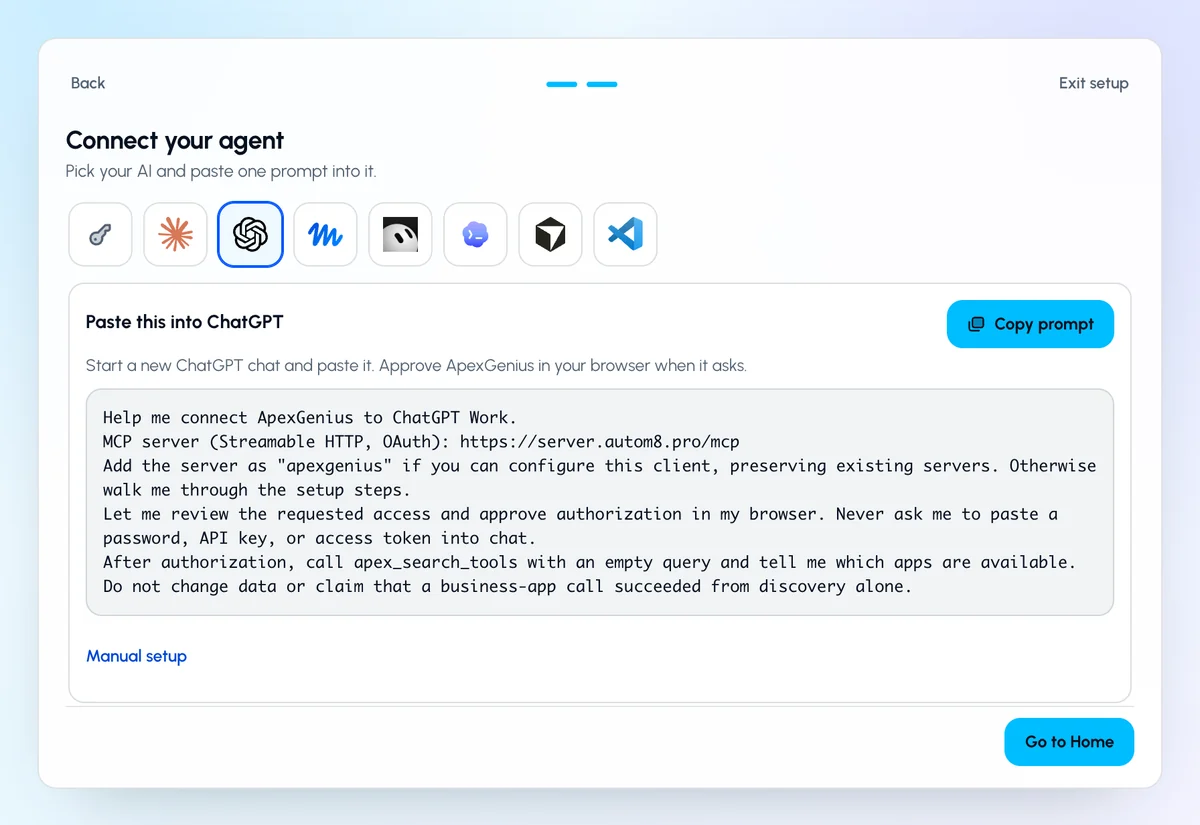
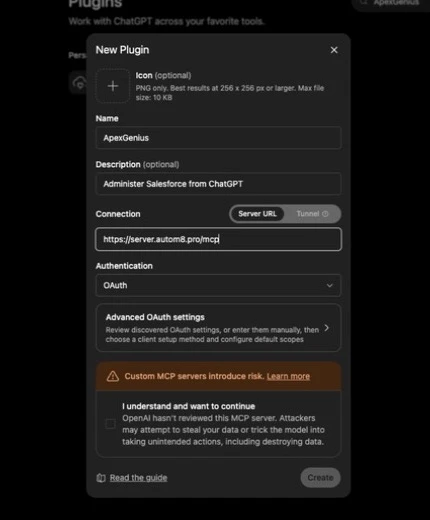
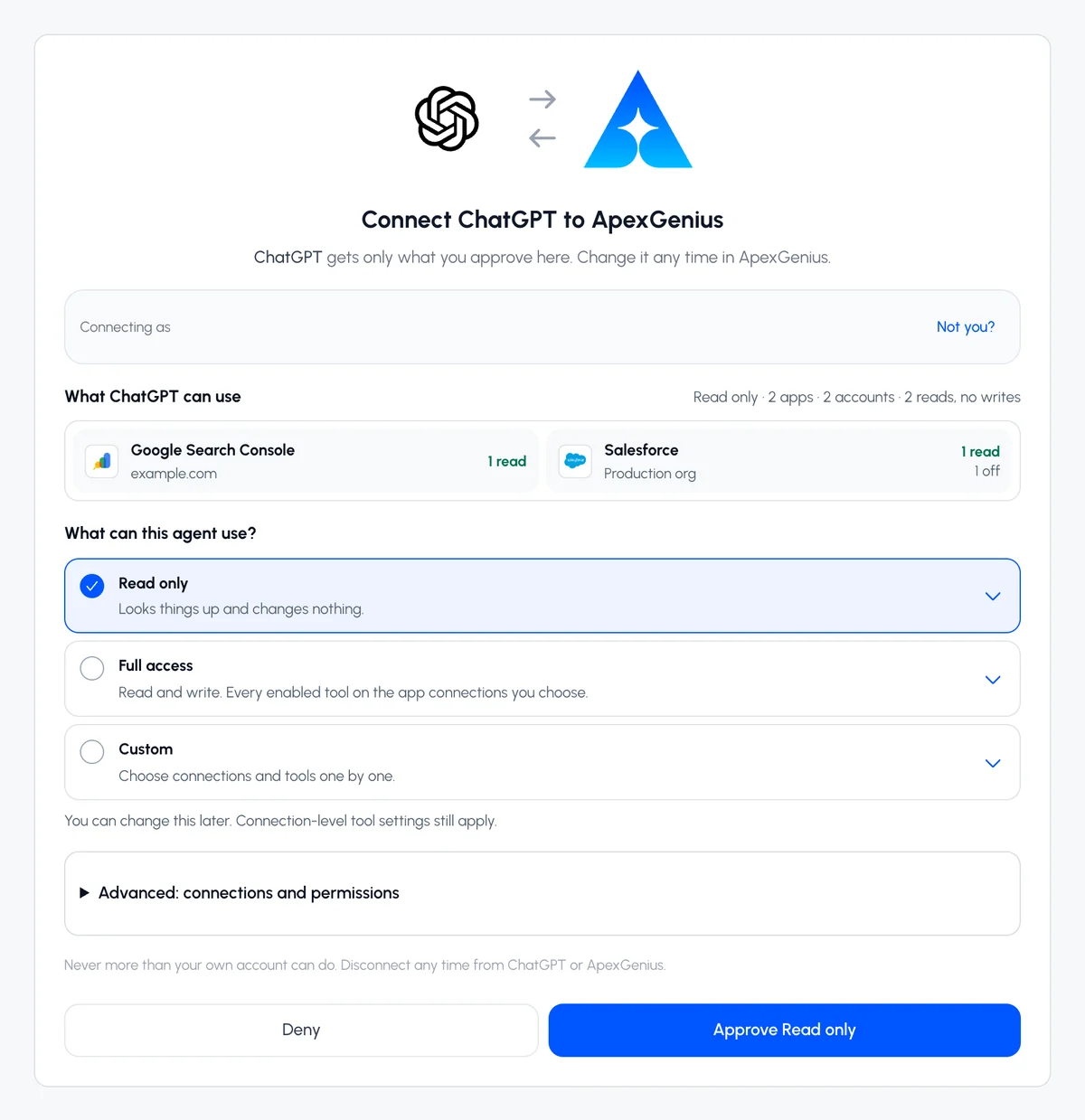
Ask for tomorrow's meeting prep
Ask for the brief using your connected apps. Check the returned sources and the matching read in Activity.
Start free. Pay when you need more.
Start free with 1,000 credits. Subscribe for $25 per user each month for 20,000 credits a month. Salesforce calls are always free.
$25 per user, each month
- Self-serve connectors enabled for your account in one gateway
- 20,000 credits a month, Salesforce calls free
- Cancel from Billing at any time
Start with tomorrow's first meeting.
Create the account, authorize Calendar and Gmail, pick the account, ask for the prep.
1,000 free credits · No card required
Creates your ApexGenius account only. Search Console, Google Analytics, YouTube, Gmail and Drive are separate Google connections, each with its own authorization, scopes and resource selection. Nothing is bundled by signing in or by one Workspace grant.